Category Archives: SQL Server 2008 R2

How to enable Dedicated Administrator Connection Feature in SQL Server 2008?

DAC feature added from the SQL Server 2005 version. Using DAC feature a Database Administrator can connect to a SQL Server Instance when the database engine is not responding to regular connections and troubleshoot the issue.

Advantage of using DAC is DBA can connect to a SQL Server Instance and execute T-SQL commands to troubleshoot and fix issues rather than rebooting the SQL Server which could lead to database corruption or other problems.

By default DAC is disable, it is a best practice to enable the DAC.
We can enable the DAC using below T-SQL command.

Use master
GO
sp_configure 'show advanced options' , 1
GO
sp_configure 'remote admin connections', 1
GO
RECONFIGURE
GO

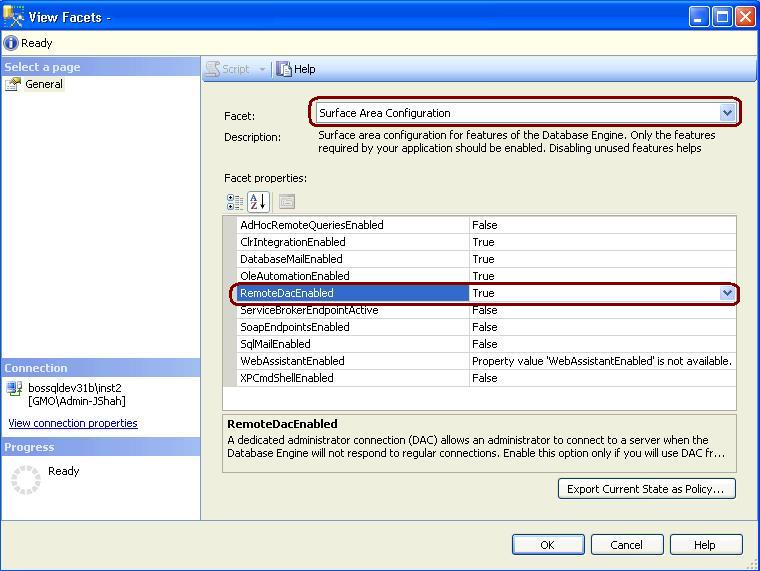
In SQL Server 2008 to enable the DAC, right click on SQL Server and Select facets and from facets drop down Select Surface Area Configuration.
How to Turn Off SSMS Auto Recovery Feature

Problem
By default the Auto Recovery feature is enabled for SSMS and because of this when opening SSMS it may hang or become unresponsive for some time if the previous session was closed unexpectedly. There is not a way to turn this feature off from within SSMS, but we will look at how this can be done by modifying some registry entries.

Solution
http://www.mssqltips.com/tip.asp?tip=2352

Script to Monitor the progress of ALTER, Backup, Restore, DBCC, Rollback and TDE commands

We often like to check the progess or completed percentage of time consuming command. You can query the sys.dm_exec_requests DMV to check the status of the command.

You must have atleast view state permission to execute the below query.
ALTER INDEX REORGANIZE
AUTO_SHRINK option with ALTER DATABASE
BACKUP DATABASE
DBCC CHECKDB
DBCC CHECKFILEGROUP
DBCC CHECKTABLE
DBCC INDEXDEFRAG
DBCC SHRINKDATABASE
DBCC SHRINKFILE
RECOVERY
RESTORE DATABASE
ROLLBACK
TDE ENCRYPTION

SELECT dmr.session_id,
       dmr.status,
       dmr.start_time,
       dmr.command,
       dmt.TEXT,
       dmr.percent_complete
FROM sys.dm_exec_requests dmr  CROSS APPLY sys.Dm_exec_sql_text(dmr.sql_handle) dmt WHERE dmr.command IN (‘ALTER’, ‘Backup’, ‘Restore’, ‘DBCC’, ‘Rollback’,  ‘TDE’)

Script to Update Statistics by passing database name

You can use below script to update the statistics with the FULL Scan. You can pass the database name in below script, I have given JShah as database name.

EXEC Sp_msforeachdb
@command1=‘IF ”#” IN (”JShah”) BEGIN PRINT ”#”;
EXEC #.dbo.sp_msForEachTable ”UPDATE STATISTICS ? WITH FULLSCAN”, @command2=”PRINT CONVERT(VARCHAR, GETDATE(), 9) + ”” - ? Stats Updated””” END’
,@replaceChar = ‘#’

You can use below script to update the statistics with the SAMPLE Percent agrument. You can pass the database name in below script, I have given JShah as database name.

EXEC Sp_msforeachdb
@command1=‘IF ”#” IN (”JShah”) BEGIN PRINT ”#”;
EXEC #.dbo.sp_msForEachTable ”UPDATE STATISTICS ? WITH SAMPLE 50 PERCENT”, @command2=”PRINT CONVERT(VARCHAR, GETDATE(), 9) + ”” - ? Stats Updated””” END’
,@replaceChar = ‘#’