Category Archives: SQL Server

Difference between temporary table and table variable

Temporary TablesThere are two types of temporary tables:

Local Temporary Table: Local temporary tables are visible only to their creators during the same connection to an instance of SQL Server as when the tables were first created or referenced. Local temporary tables are deleted after the user disconnects from the instance of SQL Server

You can create local temporary table adding # sign again the table name

Global Temporary Table: Global temporary tables are visible to any user and any connection after they are created, and are deleted when all users that are referencing the table disconnect from the instance of SQL Server.

You can create global temporary table adding ## sign again the table name

What are the things you can do with the temporary tables?
-Add/drop constraints except foreign key
-You can perform DDL statements (Alter, Drop)
-Create clustered and non-clustered indexes
-Use identity columns
-Use it in transaction and it support transaction
-Perform any DML operations (SELECT, INSERT, UPDATE, DELETE)
-Create the table with same name using different session; make sure constraint name must be different in the table.

-- Adding the constraint primary key and unique key
-- constraint will create the cluster and non-cluster index
create table #temptbl
(id int identity (100,1) Primary key,
data varchar(20) constraint UK Unique
)

insert into #temptbl values ('Jugal')
insert into #temptbl values ('Jugal1')
insert into #temptbl values ('Jugal2')

select * from #temptbl
sp_help #temptbl

--Adding column to existing temporary table
alter table #temptbl
Add Name varchar(20) null

-- Modifying column
alter table #temptbl
alter column name varchar(30)

--adding index
create nonclustered index UK2 on #temptbl (name)

--checking indexes
sp_helpindex #temptbl

-- Supports transaction
begin tran
insert into #temptbl values('sqldbpool','sqldbpool')
rollback

select * from #temptbl

--Checking for the foreign key
create table #temptbl1
(
id int constraint FK1 references #temptbl1(id),
value int
)
--Skipping FOREIGN KEY constraint 'FK1' definition for temporary table. FOREIGN KEY constraints are not enforced on local or global temporary tables.

insert into #temptbl1 values(2000,10)

--DML Opertaions
select * from #temptbl

update #temptbl set data = 'SQLDBPool'
where id = 100

select * from #temptbl

delete from #temptbl where id = 101

select * from #temptbl
--dropping temporary table
drop table #temptbl

Table variableThe syntax for creating table variables is quite similar to creating either regular or temporary tables. The only differences involve a naming convention unique to variables in general, and the need to declare the table variable as you would any other local variable in Transact SQL. Life span of the table variable is limited to life of the transaction. You can only create the cluster index on table variable.

-- creating table variable
declare @var table 
(id int identity(100,1) primary key, 
 data varchar(20) default 'hi'
 )

--Checking DML Statement --working fine
insert into @var values('jugal')
insert into @var values('sqldbpool')
delete from @var where id = 100
update @var set data = 'sqldbpool-1' where id = 101
select * from @var


-- Checking transaction support/doesn't support transaction
begin tran
declare @var table 
(id int identity(100,1) primary key, 
 data varchar(20) default 'hi'
 )

insert into @var values('jugal')
insert into @var values('sqldbpool')
insert into @var values (DEFAULT)
delete from @var where id = 100
update @var set data = 'sqldbpool-1' where id = 101

rollback
select * from @var
-- Checking alter failed/doesn't support DDL
alter table @var
alter column data varchar(30)

alter table @var
Add Name varchar(20) null

Similarities between temporary tables and table variable:– Both are created in tempdb
– You can create constraint like primary key, default and check on both but the table variable has certain limitation for the default and check constrain where you can not use UDF
– Clustered indexes can be created on table variables and temporary tables
– Both are logged in the transaction log but the tempDB recovery model is SIMPLE, log will be truncated once the trasaction get complete.
Just as with temp and regular tables, users can perform all Data Modification Language (DML) queries against a table variable: SELECT, INSERT, UPDATE, and DELETE.

Differences
– You can not create non-cluster index and statistics on table variable but you can create it on temporary table.
– You can not use DDL statement on table variable but you can use it on temporary table.
– Table variable doesn’t support transaction wheras temporary table supports.
T-SQL Script to Check/Create directory

Recently I came across a situation where I need to check whether the directory is exists or not, in case if the directory does not exist, I have to create new one.

As a solution, I have created below script to fix the issue.

	declare @chkdirectory as nvarchar(4000)
	declare @folder_exists as int
	
	set @chkdirectory = 'C:\SQLDBPool\SQL\Articles'

	declare @file_results table 
	(file_exists int,
	file_is_a_directory int,
	parent_directory_exists int
	)

	insert into @file_results
	(file_exists, file_is_a_directory, parent_directory_exists)
	exec master.dbo.xp_fileexist @chkdirectory
	
	select @folder_exists = file_is_a_directory
	from @file_results
	
	--script to create directory		
	if @folder_exists = 0
	 begin
		print 'Directory is not exists, creating new one'
		EXECUTE master.dbo.xp_create_subdir @chkdirectory
		print @chkdirectory +  'created on' + @@servername
	 end		
	else
	print 'Directory already exists'
GO 

Change Data Capture in SQL Server 2008

Change Data Capture (CDC) is a new feature in SQL Server 2008 which records insert, update and delete activity in SQL Server tables.

CDC is intended to capture insert, update and delete activity on a SQL table and place the information into a separate relational table.  It uses an asynchronous capture mechanism that reads the transaction logs and populates the CDC table with the row’s data which change.  The CDC table mirrors the column structure of the tracked table, together with metadata regarding the change.

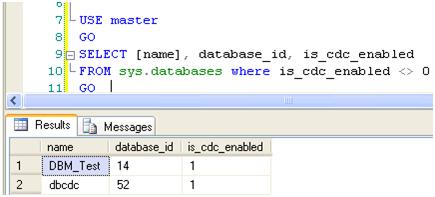
To use the CDC feature, first we have to enable it database level. You can use below query to retrieve the CDC enabled databases.

Steps to Enable the CDC on database level

USE master
GO
SELECT [name], database_id, is_cdc_enabled 
FROM sys.databases where is_cdc_enabled <> 0     
GO

You can use below script to create the sample database and table

create database SQLDBPool
go

Sample DB and Table Creation Script

use sqldbpool
create table Employee
(
empID int constraint PK_Employee primary key Identity(1,1)
,empName varchar(20)
,salary int
)

insert into Employee values('Jugal','50000000'),('Abhinav',1000),('Sunil',2000)

To enable CDC on database SQLDBPool execute the below query.

USE SQLDBPool
GO
EXEC sys.sp_cdc_enable_db

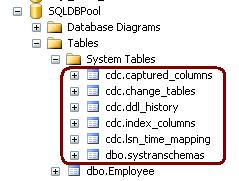
Once you have enabled the CDC for the database, you can see the CDC schema, CDC User and CDC tables in the database. Please see the below images for more information.

CDC Schema, CDC User and CDC system tables

cdc.captured_columns – Returns list of captured column
cdc.change_tables – Returns list of all the CDC enabled tables
cdc.ddl_history – Records history of all the DDL changes since capture data enabled
cdc.index_columns – Contains indexes associated with change table
cdc.lsn_time_mapping – Maps LSN number and time

Enable CDC on Table

As CDC feature can be applied at the table-level to any CDC enabled database. You can run below query to enable the CDC on the table.

Please note:
– You must have database owner permission (db_Owner fixed role)
– SQL Agent Service must be running

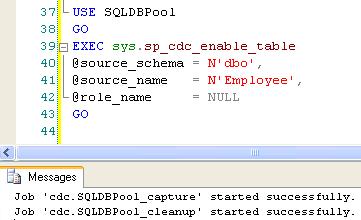
Using sys.sp_cdc_enable_table procedure we can enable the CDC at the table level. You can specify all the below different options as required.

@source_schema is the schema name of the table that you want to enable for CDC
@source_name is the table name that you want to enable for CDC
@role_name is a database role which will be used to determine whether a user can access the CDC data; the role will be created if it doesn’t exist.
@supports_net_changes determines whether you can summarize multiple changes into a single change record; set to 1 to allow, 0 otherwise.
@capture_instance is a name that you assign to this particular CDC instance; you can have up two instances for a given table.
@index_name is the name of a unique index to use to identify rows in the source table; you can specify NULL if the source table has a primary key.
@captured_column_list is a comma-separated list of column names that you want to enable for CDC; you can specify NULL to enable all columns.
@filegroup_name allows you to specify the FILEGROUP to be used to store the CDC change tables.
@partition_switch allows you to specify whether the ALTER TABLE SWITCH PARTITION command is allowed

USE SQLDBPool
GO
EXEC sys.sp_cdc_enable_table
@source_schema = N'dbo',
@source_name = N'Employee',
@role_name = NULL
GO

cdc.SQLDBPool_capture – Capture the changes by doing log scan
cdc. SQLDBPool _cleanup –Clean Up the database changes tables.

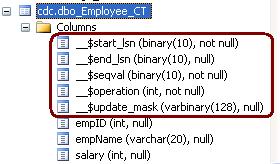
Once the above query executes successfully, it will create 1 more system table cdc.dbo.Employee_CT for the tracking purpose.

See the result of the SELECT query on both the tables.

Below 5 additional columns are available into cdc.dbo.Employee_CT table.

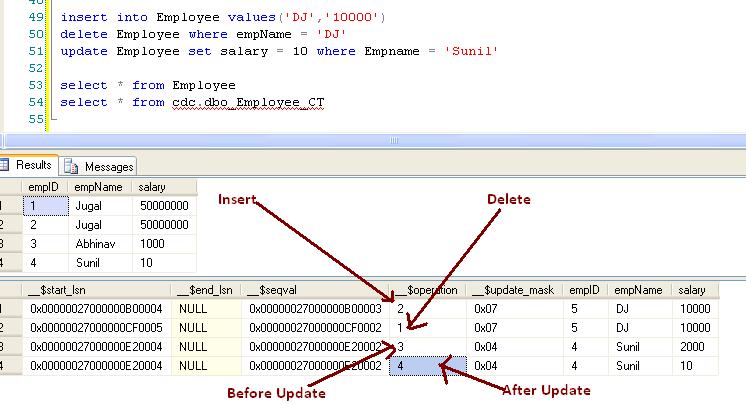
__$operation and __$update_mask are very important columns. __$operation table contains the value against the DML operations.

1 = Delete Statement
2 = Insert Statement
3 = Value before Update Statement
4 = Value after Update Statement

__$update_mask A bit mask with a bit corresponding to each captured column identified for the capture instance. This value has all defined bits set to 1 when __$operation = 1 or 2. When __$operation = 3 or 4, only those bits corresponding to columns that changed are set to 1.

Example

Execute the below query on the SQLDBPool database.

insert into Employee values('DJ','10000')
delete Employee where empName = 'DJ'
update Employee set salary = 10 where Empname = 'Sunil'
select * from Employee
select * from cdc.dbo_Employee_CT

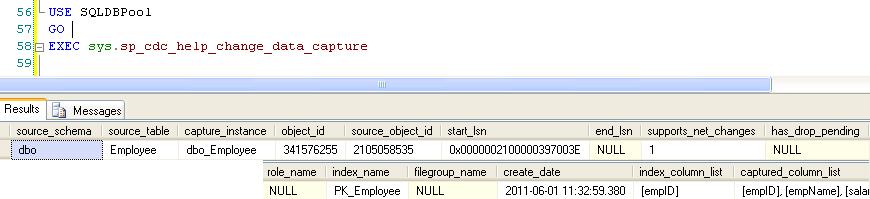
You can get more information on the CDC configuration by executing sys.sp_cdc_help_change_data_capture stored procedure.

You can disable the CDC either on the table level or the database level. Use below code to disable the CDC on table or database level.

Table Level

exec sys.sp_cdc_disable_table
@source_schema = 'dbo',
@source_name = 'Employee',
@capture_instance = 'dbo_Employee' 

Database Level

use SQLDBPool;
go
sys.sp_cdc_disable_db

CleanUp Job
As we checked in the above example that CDC is capturing all the changes at the table level which create the disk space issue. To resolve disk space issue we have clean up job which run every 3 days interval by default. We can schedule it to run as per our requirement.

SQL Server Central Management Servers System Tables

ProblemI have SQL Server Central Management Servers setup in my environment. How can I get a list of the registered servers and their associated properties? Are there any queries I can issue? Check out this tip to learn more.

Solutions
http://www.mssqltips.com/tip.asp?tip=2397