Category Archives: SQL Server

Bug Fix:The I/O operation has been aborted because of either a thread exit or an application request

Error

Read on “VDI_FCA0B3E9” failed: 995(The I/O operation has been aborted because of either a thread exit or an application request.)

The media family on device LiteSpeed for SQL Server backup file is incorrectly formed. SQL Server cannot process this media family.

Solution
In recent times I came across the above error, while restoring the database. We are using the Quest LiteSpeed for the backup/restore. As per the request from the user we have started the restore of the database from the production box to development box.

Restore Query is failing with the above error. I have follow the below checklist to fix the error.

  1. Check for the LiteSpeed version on both the boxes
  2. Verified the backup file
  3. Verified the backup file path

I got the positive result on all the above tests but still the restore is failing. At last I checked the one day old emails and found that, production box was migrated from SQL Server 2005 to SQL Server 2008. As you may know that we can’t restore the database from higher version to lower version because of that restore was failed.

Finally I have restore the database on the different SQL Server 2008 development box and up-grade the SQL Server 2005 box with SQL Server 2008

If you come across such kind of error, make sure you are checking the SQL Server version and LiteSpeed version on both source and destination machine.
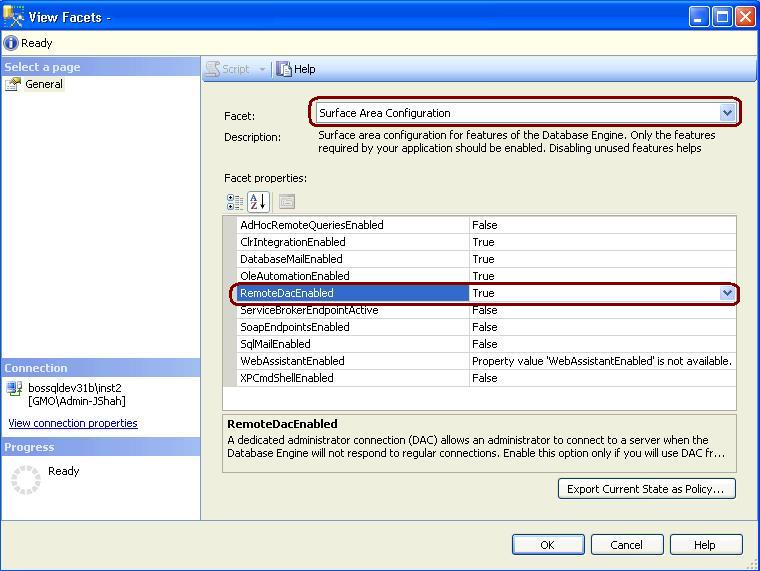
How to enable Dedicated Administrator Connection Feature in SQL Server 2008?

DAC feature added from the SQL Server 2005 version. Using DAC feature a Database Administrator can connect to a SQL Server Instance when the database engine is not responding to regular connections and troubleshoot the issue.

Advantage of using DAC is DBA can connect to a SQL Server Instance and execute T-SQL commands to troubleshoot and fix issues rather than rebooting the SQL Server which could lead to database corruption or other problems.

By default DAC is disable, it is a best practice to enable the DAC.
We can enable the DAC using below T-SQL command.

Use master
GO
sp_configure 'show advanced options' , 1
GO
sp_configure 'remote admin connections', 1
GO
RECONFIGURE
GO

In SQL Server 2008 to enable the DAC, right click on SQL Server and Select facets and from facets drop down Select Surface Area Configuration.

How to Turn Off SSMS Auto Recovery Feature

Problem
By default the Auto Recovery feature is enabled for SSMS and because of this when opening SSMS it may hang or become unresponsive for some time if the previous session was closed unexpectedly. There is not a way to turn this feature off from within SSMS, but we will look at how this can be done by modifying some registry entries.

Solution
http://www.mssqltips.com/tip.asp?tip=2352

What is .TUF file in Log Shipping?

TUF file is a Microsoft SQL Server Transaction Undo file. .TUF File contains the information regarding any modifications that were made as part of incomplete transactions at the time the backup was performed.

A transaction undo(.TUF) file is required if a database is loaded in read-only state. In this state, further transaction log backups may be applied.