It is often asked by the people can we change the batch separator T-SQL. Answer is yes we can change the batch separator.
We can do it by Tools->Options->Query Execution->SQL Server->General->Batch separator
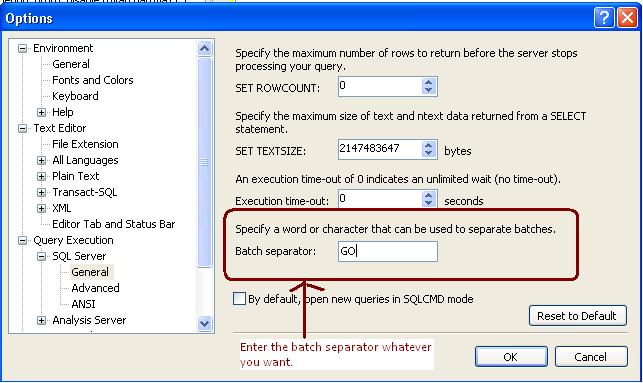
It is often asked by the people can we change the batch separator T-SQL. Answer is yes we can change the batch separator.
We can do it by Tools->Options->Query Execution->SQL Server->General->Batch separator
As best practice it is recommended that you have to backup date time with the backup file name so anyone can get the idea of Backup creation.
Sometimes due some issue we took backup without specifying the datetime with the backup file name so during restore we are unsure that how much data backed up in the backup file, type of backup, Is it Copy only and more.
SQL Server stores the Backup Metadata into backup header. You can restore header only command to get the required information.
RESTORE headeronly FROM disk = ‘c:\jshah.bak’
| Column Name | Values | Description |
| BackupName | NULL | |
| BackupDescription | NULL | |
| BackupType | 1 | Backup type: 1 = Database 2 = Transaction log 4 = File 5 = Differential database 6 = Differential file 7 = Partial 8 = Differential partial |
| ExpirationDate | NULL | |
| Compressed | 0 | 0 = Un-Compressed Backup 1 = Compressed Backup |
| Position | 1 | |
| DeviceType | 2 | |
| UserName | JShah | |
| ServerName | SQLDBPool | |
| DatabaseName | jshah | |
| DatabaseVersion | 655 | |
| DatabaseCreationDate | 12/31/10 9:55 AM | |
| BackupSize | 1453056 | |
| FirstLSN | 28000000006000100 | |
| LastLSN | 28000000013000000 | |
| CheckpointLSN | 28000000006000100 | |
| DatabaseBackupLSN | 0 | |
| BackupStartDate | 12/31/10 10:06 AM | |
| BackupFinishDate | 12/31/10 10:06 AM | |
| SortOrder | 52 | |
| CodePage | 0 | |
| UnicodeLocaleId | 1033 | |
| UnicodeComparisonStyle | 196609 | |
| CompatibilityLevel | 100 | |
| SoftwareVendorId | 4608 | |
| SoftwareVersionMajor | 10 | |
| SoftwareVersionMinor | 0 | |
| SoftwareVersionBuild | 2757 | |
| MachineName | SQLDBPool | |
| Flags | 512 | 1 = Log backup contains bulk-logged operations. 2 = Snapshot backup. 4 = Database was read-only when backed up. 8 = Database was in single-user mode when backed up. 16 = Backup contains backup checksums. 32 = Database was damaged when backed up, but the backup operation was requested to continue despite errors. 64 = Tail log backup. 128 = Tail log backup with incomplete metadata. 256 = Tail log backup with NORECOVERY. |
| BindingID | 85A5505D-ADB1-4B33-A181-549DC520A0F8 | |
| RecoveryForkID | 03DE5437-1E27-4885-9011-91CFED12338A | |
| Collation | SQL_Latin1_General_CP1_CI_AS | |
| FamilyGUID | 03DE5437-1E27-4885-9011-91CFED12338A | |
| HasBulkLoggedData | 0 | 1 = Yes 0 = No |
| IsSnapshot | 0 | 1 = Yes 0 = No |
| IsReadOnly | 0 | 1 = Yes 0 = No |
| IsSingleUser | 0 | 1 = Yes 0 = No |
| HasBackupChecksums | 0 | 1 = Yes 0 = No |
| IsDamaged | 0 | 1 = Yes 0 = No |
| BeginsLogChain | 0 | 1 = Yes 0 = No |
| HasIncompleteMetaData | 0 | 1 = Yes 0 = No |
| IsForceOffline | 0 | 1 = Yes 0 = No |
| IsCopyOnly | 0 | 1 = Yes 0 = No |
| FirstRecoveryForkID | 03DE5437-1E27-4885-9011-91CFED12338A | |
| ForkPointLSN | NULL | |
| RecoveryModel | FULL | |
| DifferentialBaseLSN | NULL | |
| DifferentialBaseGUID | NULL | |
| BackupTypeDescription | Database | |
| BackupSetGUID | 62EB4399-C119-42C2-91F1-BF0FF19CB896 | |
| CompressedBackupSize | 1453056 |
It is frequently asked by the DBAs or SystemAdmins or Customer that how many databases can be mirrored on a single instance of Microsoft SQL Server?
Answer of the above question is you can configure 10 databases for 32-bit operating system.On a 32-bit system, database mirroring can support a maximum of about 10 databases per server instance because of the numbers of worker threads that are consumed by each database mirroring session.
For 64-Bit Operating system you can mirror more than 10 databases depending on the number of processors and worker threads. Many company has deployed more that 10 Databases as mirrored.
Problem
Today I got an email from one of my blog reader; they have an application developed with VB6.0 and SQL Server 2000. Application was developed long back and now their database size is increased as well. Due un-efficient coding they are getting blocking issue and stuck all their application transactions. He asked for writing a query which will execute by SQL Server Agent at every 1 minute and will KILL the culprit SPID. He also wants me to store the KILL transaction history as well.
As a solution I have written below query for him and which working fine now.
-- Create below table in master database
 create table blkHistory
(
	SPID int,
	blocked int,
	killedSPID int,
	date datetime default getdate(),
	querytext varchar(8000)
)


-- add below code in to job command text box
declare @SPID as int,
        @blocked as int,
        @KilledSPID as int

declare @querytext as varchar(8000), @sql nvarchar(400)

select @SPID = spid,@blocked = blocked from sysprocesses where blocked <> 0

--select spid,blocked from sysprocesses where blocked <> 0

select @sql = 'KILL ' + cast (@blocked as nvarchar(100))

DECLARE @Handle binary(20)
SELECT @Handle = sql_handle FROM sysprocesses WHERE spid = @blocked

SELECT @querytext = text FROM ::fn_get_sql(@Handle)

EXECUTE sp_executesql @SQL

If @SPID > 0
begin
insert into blkHistory(SPID,blocked,KilledSPID,querytext)
values (@SPID,@blocked,@blocked,@querytext)
end

--you can use below query to retrieve datafrom blocking history
select * from master..blkHistory
|
You can follow the below steps to enter error log records into temporary table and query it.
-- Command will create the temporary table in tempdb CREATE TABLE [dbo].[#TmpErrorLog] ([LogDate] DATETIME NULL, [ProcessInfo] VARCHAR(20) NULL, [Text] VARCHAR(MAX) NULL ) ; -- Command will insert the errorlog data into temporary table INSERT INTO #TmpErrorLog ([LogDate], [ProcessInfo], [Text]) EXEC [master].[dbo].[xp_readerrorlog] 0 ; -- retrieves the data from temporary table SELECT * FROM #TmpErrorLog |
 aiDeeva.com