Category Archives: SQL Server

Msg 7391, Level 16, State 2, Line 23 – Error while running Linked Server

Error Description 

OLE DB provider “SQLNCLI” for linked server “MYView” returned message “The transaction manager has disabled its support for remote/network transactions.”.

 Msg 7391, Level 16, State 2, Line 23

 The operation could not be performed because OLE DB provider “SQLNCLI” for linked server “MYView” was unable to begin a distributed transaction.

 Resolution:

1. Check whether DTC is blocked by firewall, if it is blocked by firewall release it.

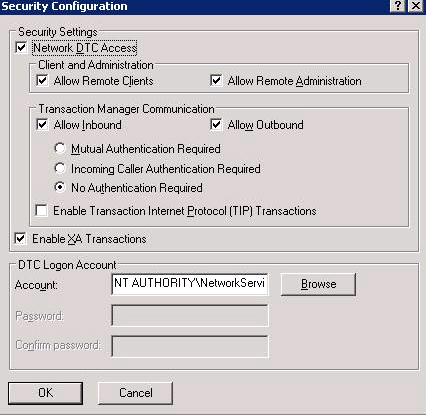
2. Check or configure DTC to allow network connection as below.

 msdtc

Go to Control Panel ->Administrative Tools -> Component Services -> Expand the Computer Node -> Right click on My Computer) -> Click on Properties -> MS DTC Tab -> Security Configuration


Script – Generate DBCC ShrinkFile for each datbase files

You can use below query to generate DBCC Shrikfile command for data and log file. Next step you have to copy the output from the result windows & execute it.

Query

select 'use ' + db_name(dbid) + char(13) + 'dbcc shrinkfile (' + quotename(sf.name,'''') + ' ,truncateonly)' from sysaltfiles sf
inner join sys.databases sd on sf.dbid = sd.database_id
where state_desc = 'online'


DBCC PAGE

 DBCC PAGE 

We can use the undocumented DBCC PAGE command to view the page header, data rows, and row offset table for any data page in a database. You have to turn on traceflag 3604 before running this command.  You can also use this command when you find the IO bottleneck and query is waiting Page Latches.

Permission: System Admin rights

Syntax

dbcc page ( {‘dbname’ | dbid}, file number, page number [, print opt={0|1|2|3} ])

 You can pass the below print option parameter as per the requirement

  • 0 – print just the page header
  • 1 – page header plus per-row hex dumps and a dump of the page slot array (unless it’s a page that doesn’t have one, like allocation bitmaps)
  • 2 – page header plus whole page hex dump
  • 3 – page header plus detailed per-row interpretation

Trace Flag – 3604 Trace flag 3604 is the most commonly used trace flag. It sends the output of a trace to the client. For example, before you can run DBCC PAGE, which views data page information, you must run this trace flag. 

DBCC traceon(3604)

DBCC PAGE ( {dbid | dbname}, filenum, pagenum [, printopt] [, cache] ) 

The output from DBCC PAGE is divided into four main sections: Buffer, Page Header, Data, and Offset Table (really the Offset Array).

Shrink Log File

Just a few days back I received an issue regarding disk size is out of space. I have tried to shrink the database using DBCC ShrinkFile but there isn’t any success.

I have follow below steps to resolve this issue and it really works.

I have check the below query for

Select name,log_reuse_wait_desc from sys.databases

  1. There was another database which is waiting log backup to release the space
  2. There was one database who is waiting for Replication to release the space

Database who is waiting for log backup to release the log space

I have taken the log backup two times and executed the database shrink file command to release the space and it has reclaimed 40GB space from transaction log file.

Database who is waiting for Replication to release the log space

This database is in Simple recovery mode and there isn’t any replication enable on this. I have executed the DBCC OPENTRAN command to see any active transaction. I have executed the DBCC OpenTran and it has provided me the below result.

Oldest active transaction:

    SPID (server process ID): 101

    UID (user ID) : -1

    Name          : INSERT

    LSN           : (999:138204:2)

    Start time    : OCT  13 2009  1:34:47:827PM

    SID           : 0x88d52e4051a71143adee5dc7b6619f8a

Replicated Transaction Information:

        Oldest distributed LSN     : (890:2091888:1)

        Oldest non-distributed LSN : (896:2784855:1)

I don’t know the exact reason what happened internally. But from the output it seems that there is unmark distributed transaction. So I have executed Sp_Repldone command to unmark the LSN


EXEC sp_repldone @xactid = NULL, @xact_segno = NULL, @numtrans = 0,     @time = 0, @reset = 1

 Than I have executed the DBCC ShrinkFile command and it has reclaimed the 400GB space