Category Archives: SQL Server

SQL Server Services

As per the options you choose during the SQL Server installation, it will install below services on server.

SQL Server Database Services – The service is used for SQL Server relational Database Engine.

SQL Server Agent – is used for scheduling. It executes jobs, monitors SQL Server, send alerts, and enables automation of some of the administrative tasks.

Analysis Services – Provides online analytical processing (OLAP) and data mining functionality for business intelligence applications.

Reporting Services – Manages, executes, creates, schedules, and delivers reports.

Integration Services –is used for SSIS package. It provides management support for Integration Services package storage and execution.

SQL Server Browser – The name resolution service that provides SQL Server connection information for client computers. It is used for named instance only.

Full-text search – Provided full text index and searching facility for BLOB columns.

SQL Server Active Directory Helper – Publishes and manages SQL Server services in Active Directory.

SQL Writer – Allows backup and restore applications to operate in the Volume Shadow Copy Service (VSS) framework.
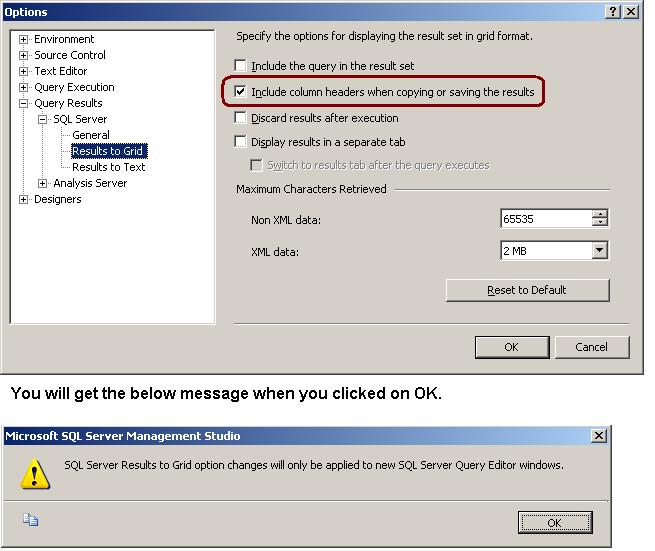
Copying column headers with grid query results in SQL Server Management Studio

Many times when we are copying result from the Result Set GRID, column headers are not copied with it. To copy the column header you have to enable it.

Go to Tools menu -> Option -> Query Results -> SQL Server -> Results to Grid -> Checked the “Include column headers when copying or saving the result” check box

Script to get the last update statistics date

Below script will execute against the sys.Objects,sys.indexes and sys.stats. Script will return last statistics update date and meta data of  statistics. Script will return the result for table and view level statistics.

In this script I have used the function STATS_DATE which will return last updated statistics date.

Syntax
STATS_DATE ( table_id , index_id )

SELECT sysobj.name AS objectname,
sysindex.name AS indexname,
Stats_date(sysindex.[object_id], sysindex.index_id) AS
[Statistics Update Date],
CASE sysstats.auto_created
WHEN 0 THEN ‘No’
WHEN 1 THEN ‘Yes’
END AS
isstatscreatedbyqueryprocessor,
CASE sysstats.user_created
WHEN 0 THEN ‘No’
WHEN 1 THEN ‘Yes’
END AS
isstatscreatedbyuser,
CASE sysstats.no_recompute
WHEN 0 THEN ‘No’
WHEN 1 THEN ‘Yes’
END AS
isstatscreatedwithnorecomputeoption
FROM sys.objects AS sysobj WITH (nolock)
INNER JOIN sys.indexes AS sysindex WITH (nolock)
ON sysobj.[object_id] = sysindex.[object_id]
INNER JOIN sys.stats AS sysstats WITH (nolock)
ON sysindex.[object_id] = sysstats.[object_id]
AND sysindex.index_id = sysstats.stats_id
WHERE sysobj.[type] IN ( ‘U’, ‘V’ )
ORDER BY Stats_date(sysindex.[object_id], sysindex.index_id);

SQL Server 2005/2008 Standard Reports

In the new versions of SQL Server Microsoft has included very useful standard reports. We can use these different kind of report for performance-tuning, activity monitoring, Query tuning, troubleshooting IO bottlenecks.

You can follow below steps to get the standard reports.
Right Click On SQL Server -> Goto Reports -> Goto Standard Reports