Category Archives: SQL Server

Script to list out SQL Logins and Database User Mappings

You can use system stored procedure sp_msloginmappings to list out the SQL logins and database user mappings.

Syntax
sp_msloginmappings @Loginname , @Flags

@Loginname – Optional argument, in case if you not specify the Login name procedure will return the result for all the SQL Server logins
@Flags – You can specify value 0 or 1, 0 value will show user mapping to all databases and 1 will show the user mapping to current database only. Default value is 0

use master
go
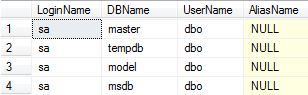
exec sp_msloginmappings 'sa', 0

Image2

use master
go
exec sp_msloginmappings 'sa', 1

Image1

In case you want to run the sp_msloginmappings across multiple SQL Instance using either Central management server or powershell. You can use the below script.

 create table #loginmappings(  
  LoginName  nvarchar(128) NULL,  
  DBName     nvarchar(128) NULL,  
  UserName   nvarchar(128) NULL,  
  AliasName  nvarchar(128) NULL  
 )  
 
 insert into #loginmappings
 EXEC master..sp_msloginmappings
 
 select * from #loginmappings
 
 drop table #loginmappings

How to restart an Interrupted Database Restore in SQL Server?

Steps to restart an Interrupted Database Restore in SQL Server

There may scenario when you are restoring VLDB database backup and the restore database command interrupted due network failure, power failure, SQL Server Service restart or cluster failover. In this kind of scenario you can easily start the interrupted restore from the point of failure using WITH RESTART command.

Before you start restoring the database using WITH RESTART option check database is in Restoring State not in any other state.

You can check the database state either from SSMS object explorer or by executing below T-SQL command

select name,state_desc from sys.databases

Once confirmed that database is in restoring state execute the backup command WITH RESTART clause

RESTORE DATABASE [AdventureWorks]
FROM DISK ='D:\Backup\AdventureWorks.bak'
WITH RESTART, STATS = 20
GO

T-SQL Script to check SQL Server Instance TCP/IP Port Number

SQL Server Error Log

-- Check the error log for port number
EXEC xp_ReadErrorLog 0, 1, N'Server is listening on', N'any', NULL, NULL, 'DESC'
GO

Executing DMV Script

-- you must connect remotely using TCP/IP
SELECT local_tcp_port
FROM   sys.dm_exec_connections
WHERE  session_id = @@SPID
GO

For Dynamic Port Number
— Read the registry for port number

-- Execute below script if SQL Server is configured with dynamic port number
DECLARE       @portNo   NVARCHAR(10)
 
EXEC   xp_instance_regread
@rootkey    = 'HKEY_LOCAL_MACHINE',
@key        =
'Software\Microsoft\Microsoft SQL Server\MSSQLServer\SuperSocketNetLib\Tcp\IpAll',
@value_name = 'TcpDynamicPorts',
@value      = @portNo OUTPUT
 
SELECT [PortNumber] = @portNo
GO

For Static Port Number

-- Execute below script if SQL Server is configured with static port number
DECLARE       @portNo   NVARCHAR(10)
 
EXEC   xp_instance_regread
@rootkey    = 'HKEY_LOCAL_MACHINE',
@key        =
'Software\Microsoft\Microsoft SQL Server\MSSQLServer\SuperSocketNetLib\Tcp\IpAll',
@value_name = 'TcpPort',
@value      = @portNo OUTPUT
 
SELECT [PortNumber] = @portNo
GO

Powershell – To check the Drive and Disk Space Information

To get the disk space details of the server, simply go to command prompt and paste the below script it will give you disk space details.

powershell -command "& {Get-WmiObject -Class Win32_LogicalDisk -Filter 'DriveType = 3' |select PSComputerName, Caption,@{N='Capacity_GB'; E={[math]::Round(($_.Size / 1GB), 2)}},@{N='FreeSpace_GB'; E={[math]::Round(($_.FreeSpace / 1GB), 2)}},@{N='PercentUsed'; E={[math]::Round(((($_.Size - $_.FreeSpace) / $_.Size) * 100), 2) }},@{N='PercentFree'; E={[math]::Round((($_.FreeSpace / $_.Size) * 100), 2) }}}"

Sample Output
Caption : C:
Capacity_GB : 283.44
FreeSpace_GB : 51.48
PercentUsed : 81.84
PercentFree : 18.16

SQL Server – Backup Verification Script – Based on conditions

Problem: There are scenarios where you have to verify the multiple SQL Server instances backup within limited time frame whether it meet your organization backup criteria standards or not.

Solution:
You can execute below T-SQL script to check the backup status as per your organization standard by assigning backup conditions value to backup criteria variable. You can execute below script either by connecting each SQL Server Instance or execute it by registering all the SQL Server Instances in Central Management Server (CMS).

Below T-SQL Script work with all the versions of MSSQL Server and verify FULL, Differential and Transaction Log Backup. It will check the max backup date and evaluate result based on condition as backup is Passed or Not.

Backup Verification Script will return below values. Column names are self-explanatory.
• SQLInstanceName
• DatabaseName
• db_create_ddate
• DB_Recovery_Model
• dbstatus
• windowsservername
• productversion
• productlevel
• edition
• current_datetime
• last_full_backup_date
• last_diff_backup_date
• last_tran_backup_date
• days_since_last_full_backup
• days_since_last_diff_backup
• hours_since_last_tranlog_backup
• Full_Backup_Stauts
• Diff_Backup_Stauts
• Log_Backup_Stauts
• full_backup_location
• diff_backup_location
• tlog_backup_location

You have to specify the backup condition based on your organization standard by assigning values to below variables.

declare @full_backup_criteria_in_days int
declare @diff_backup_criteria_in_days int
declare @log_backup_criteria_in_hours int

-- specify the backup criteria
set @full_backup_criteria_in_days = 7 -- 7 day older Full Backup is Pass 
set @diff_backup_criteria_in_days = 1 -- 1 day older Diff Backup is Pass 
set @log_backup_criteria_in_hours = 2 -- 2 hours older Log Backup is Pass

Complete Backup Verification Script

declare @full_backup_criteria_in_days int
declare @diff_backup_criteria_in_days int
declare @log_backup_criteria_in_hours int

-- specify the backup criteria
set @full_backup_criteria_in_days = 7 -- 7 day older Full Backup is Pass 
set @diff_backup_criteria_in_days = 1 -- 1 day older Diff Backup is Pass 
set @log_backup_criteria_in_hours = 2 -- 2 hours older Log Backup is Pass

select     
           serverproperty('servername') as SQLInstanceName,
           quotename(bkup_full.[database_name]) as DatabaseName,
            ( select    sdb.crdate
              from      [master]..[sysdatabases] sdb
              where     sdb.name = bkup_full.[database_name]
            ) as [db_create_ddate],           
           databasepropertyex(bkup_full.[database_name],'recovery')  as DB_Recovery_Model,
           databasepropertyex(bkup_full.[database_name],'status')  as dbstatus,       
           case serverproperty('isclustered') 
                        when 1 then cast(serverproperty('computernamephysicalnetbios') as varchar)
                        when 0 then cast(serverproperty('machinename') as varchar)
           end as windowsservername,
           serverproperty('productversion') as productversion,
           serverproperty('productlevel') as productlevel,
           serverproperty('edition') as edition,

           current_timestamp as current_datetime,
		   
		   bkup_full.[backup_finish_date] as [last_full_backup_date],           
		   bkup_diff.[backup_finish_date] as [last_diff_backup_date] ,
		   bkup_log.[backup_finish_date] as [last_tran_backup_date] ,

           datediff(dd, bkup_full.[backup_finish_date], current_timestamp) as [days_since_last_full_backup] ,
           datediff(dd, bkup_diff.[backup_finish_date], current_timestamp) as [days_since_last_diff_backup] ,
           datediff(hh, bkup_log.[backup_finish_date], current_timestamp) as [hours_since_last_tranlog_backup] ,
            
           case 
                        when datediff(dd, bkup_full.[backup_finish_date], current_timestamp) <= @full_backup_criteria_in_days  
                        then 'Pass'
                        else 'Fail'
                        end as Full_Backup_Stauts,
            
            case 
                        when datediff(dd, bkup_diff.[backup_finish_date], current_timestamp) <= @diff_backup_criteria_in_days  then 'Pass'
                        else case when quotename(bkup_full.[database_name]) IN ('[master]') then 'N/A' else 'Fail' end                        
                        end as Diff_Backup_Stauts,

            case 
                        when datediff(hh, bkup_log.[backup_finish_date], current_timestamp) <= @log_backup_criteria_in_hours  then 'Pass'
                        else case when databasepropertyex(bkup_full.[database_name],'recovery') = 'SIMPLE' then 'N/A' else 'Fail' end                        
            end as Log_Backup_Stauts,            

            ( select top 1 [physical_device_name]
              from      [msdb]..[backupmediafamily] bkup_media_family
              where     bkup_media_family.[media_set_id] = bkup_full.[media_set_id]
            ) as [full_backup_location] ,
            ( select top 1  [physical_device_name]
              from      [msdb]..[backupmediafamily] bkup_media_family
              where     bkup_media_family.[media_set_id] = bkup_diff.[media_set_id]
            ) as [diff_backup_location] ,
            ( select top 1  [physical_device_name]
              from      [msdb]..[backupmediafamily] bkup_media_family
              where     bkup_media_family.[media_set_id] = bkup_log.[media_set_id]
            ) as [tlog_backup_location]
         
                             
    from    [msdb]..[backupset] as bkup_full
            left join [msdb]..[backupset] as bkup_log on bkup_log.[database_name] = bkup_full.[database_name]
                                                       and bkup_log.[server_name] = bkup_full.[server_name]
                                                       and bkup_log.[type] = N'L'
                                                       and bkup_log.[backup_finish_date] = ( (select  max([backup_finish_date])
                                                                                            from    [msdb]..[backupset] b2
                                                                                            where   b2.[database_name] = bkup_full.[database_name]
                                                                                                    and b2.[server_name] = bkup_full.[server_name]
                                                                                                    and b2.[type] = N'L') )
            left join [msdb]..[backupset] as bkup_diff on bkup_diff.[database_name] = bkup_full.[database_name]
                                                       and bkup_diff.[server_name] = bkup_full.[server_name]
                                                       and bkup_diff.[type] = N'I'
                                                       and bkup_diff.[backup_finish_date] = ( (select max([backup_finish_date])
                                                                                            from    [msdb]..[backupset] b2
                                                                                            where   b2.[database_name] = bkup_full.[database_name]
                                                                                                    and b2.[server_name] = bkup_full.[server_name]
                                                                                                     and b2.[type] = N'I') )
    where   bkup_full.[type] = N'D'
            and bkup_full.[backup_finish_date] = ( (select  max([backup_finish_date])
                                                 from   [msdb]..[backupset] b2
                                                 where  b2.[database_name] = bkup_full.[database_name]
                                                        and b2.[server_name] = bkup_full.[server_name]
                                                        and b2.[type] = N'D') )
            and exists ( select [name]
                         from   [master]..[sysdatabases]
                         where  [name] = bkup_full.[database_name] )
            and bkup_full.[database_name] <> N'tempdb'