Surface Area Configuration in SQL Server 2008

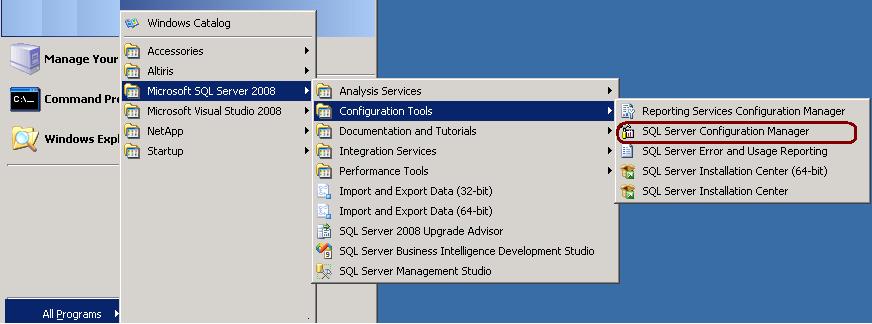
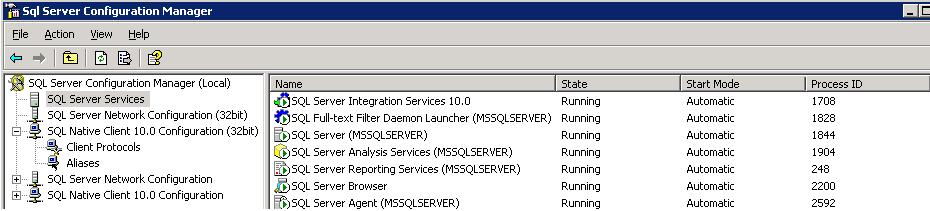
I got an email from one of my reader and He is asking me that where is SAC in SQL Server 2008. Microsoft has removed the Surface Area Configuration tool that was shipped in SQL Server 2005. The Services and Connections which were previously managed using Surface Area Configuration tool is now managed using the SQL Server Configuration Manager.

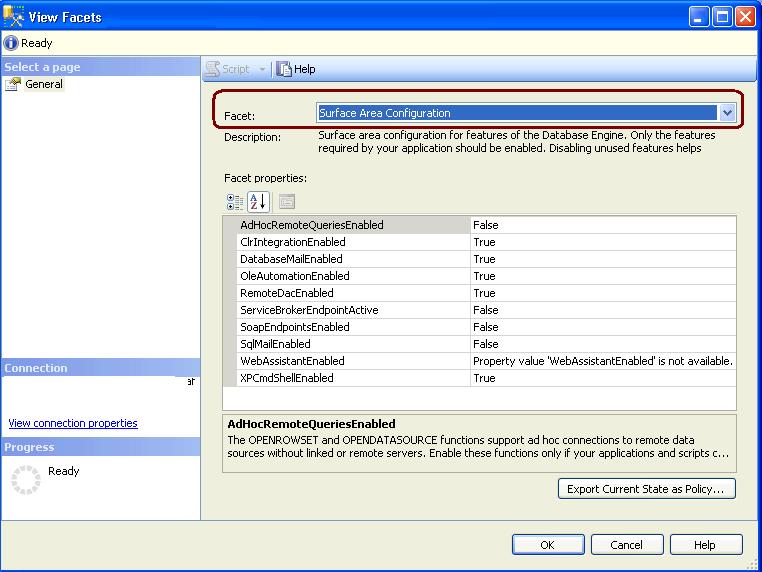
To manage the database engine features you have to use Policy Based Management. For that you have to use Surface Area Configuration facet.

You can follow below steps to configure the Database Engine features.

  1. Right Click on Server Name and Select Facets from pop up windows
  2. Select “Surface Area Configuration” from facets windows and do the appropriate desired settings
SQLWB.exe (SQL2k5) and SSMS.exe(SQL2K8)

SQLWB (sqlwb.exe) /SSMS(SSMS.exe) is the executable file that launches SQL Server Management Studio. I am usually using it to launch the SQL Server management studio instead of navigating through Start -> All Programs -> SQL Server 2005 -> SQL Server Management Studio.

Above command will launch the SQL Server 2005 Management Studio. You can launch the SQL2k8 management studio using SSMS.exe

You can also pass below list of argument with it, I am executing below command to see the list of parameters.

c:\sqlwb.exe -?

DMVs for SQL Server Cluster

sys.dm_os_cluster_nodes
This view returns a row for each node in the failover cluster instance configuration. If the current instance is a failover clustered instance, it returns a list of nodes on which this failover cluster instance has been defined.

sys.dm_io_cluster_shared_drives
This view returns the drive name of each of the shared drives if the current server instance is a clustered server. If the current server instance is not a clustered instance it returns an empty rowset.

Permission
You must have VIEW SERVER STATE permission for the SQL Server instance.


SELECT *
FROM   sys.dm_os_cluster_nodes
–OR
SELECT *
FROM   Fn_virtualservernodes()

–Shared Drives
SELECT *
FROM   sys.dm_io_cluster_shared_drives