Dear Readers,
By registering your mobile number, you will get SMS on SQLDBPool.com post. Click SMS icon for more information.

Thanks,
Jugal Shah
Dear Readers,
By registering your mobile number, you will get SMS on SQLDBPool.com post. Click SMS icon for more information.
Thanks,
Jugal Shah
No we can’t restore it. SQL Server is not allowing the restore of higher version databases to a lower version. It is not possible to restore a database from a backup of a newer version to older version as database backups are not backward compatible.
You can do below workaround to transfer higher version database to lower version.
1. Generate database script. Right Click database -> Tasks -> Generate Scripts
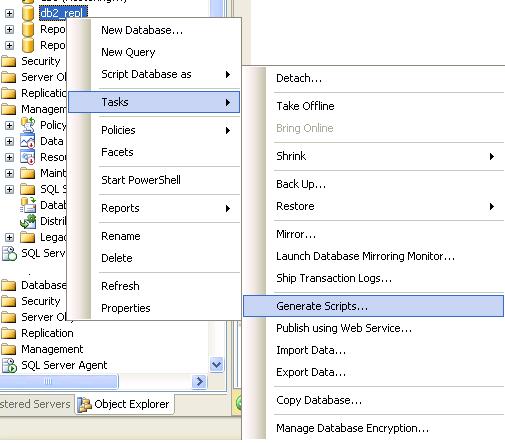
2. Execute the script on the lower version server and it will create the database and its objects
3. Transfer data between these two databases using DTS/SSIS
Dear Readers,
You can check out IntelliSense Article on MSSQLTips.com.
Thanks,
Jugal Shah
It is easy to find out the orphaned SQL logins by comparing the SID of SQL Login and User, but what in case of windows login.
Take an example if windows login is dropped and it is still exists in SQL Server. You can find out all the delete windows login which is orphaned in SQL Server, using below procedure.
Sp_validatelogins
Reports information about Windows users and groups that are mapped to SQL Server principals but no longer exist in the Windows environment.
CREATE TABLE #dropped_windows_logins
  (
     [sid]  VARBINARY(85),
     [name] SYSNAME
  )

INSERT #dropped_windows_logins
EXEC sys.Sp_validatelogins

SELECT *
FROM   #dropped_windows_logins

DROP TABLE #dropped_windows_logins
One of my blog reader requested that, how to create the directory using Script/SSMS. Here is the answer.
— Below query will list out the directories on C drive
EXEC MASTER.sys.Xp_dirtree ‘C:\JugalA’
— Below query will create the folder JugalA on C drive
EXEC MASTER.dbo.Xp_create_subdir ‘C:\JugalA’
— Below query will create the folder JugalB on C:\JugalA drive
EXEC MASTER.dbo.Xp_create_subdir ‘C:\JugalA\JugalB’
 aiDeeva.com