Backup Start Date Time and Finish Date Time

As best practice it is recommended that you have to backup date time with the backup file name so anyone can get the idea of Backup creation.

Sometimes due some issue we took backup without specifying the datetime with the backup file name so during restore we are unsure that how much data backed up in the backup file, type of backup, Is it Copy only and more.

SQL Server stores the Backup Metadata into backup header. You can restore header only command to get the required information.

RESTORE headeronly FROM disk = ‘c:\jshah.bak’ 

Column Name Values Description
BackupName NULL  
BackupDescription NULL  
BackupType 1 Backup type:
1 = Database
2 = Transaction log
4 = File
5 = Differential database
6 = Differential file
7 = Partial
8 = Differential partial
ExpirationDate NULL  
Compressed 0 0 = Un-Compressed Backup
1 = Compressed Backup
Position 1  
DeviceType 2  
UserName JShah  
ServerName SQLDBPool  
DatabaseName jshah  
DatabaseVersion 655  
DatabaseCreationDate 12/31/10 9:55 AM  
BackupSize 1453056  
FirstLSN 28000000006000100  
LastLSN 28000000013000000  
CheckpointLSN 28000000006000100  
DatabaseBackupLSN 0  
BackupStartDate 12/31/10 10:06 AM  
BackupFinishDate 12/31/10 10:06 AM  
SortOrder 52  
CodePage 0  
UnicodeLocaleId 1033  
UnicodeComparisonStyle 196609  
CompatibilityLevel 100  
SoftwareVendorId 4608  
SoftwareVersionMajor 10  
SoftwareVersionMinor 0  
SoftwareVersionBuild 2757  
MachineName SQLDBPool  
Flags 512 1 = Log backup contains bulk-logged operations.
2 = Snapshot backup.
4 = Database was read-only when backed up.
8 = Database was in single-user mode when backed up.
16 = Backup contains backup checksums.
32 = Database was damaged when backed up, but the backup operation was requested to continue despite errors.
64 = Tail log backup.
128 = Tail log backup with incomplete metadata.
256 = Tail log backup with NORECOVERY.
BindingID 85A5505D-ADB1-4B33-A181-549DC520A0F8  
RecoveryForkID 03DE5437-1E27-4885-9011-91CFED12338A  
Collation SQL_Latin1_General_CP1_CI_AS  
FamilyGUID 03DE5437-1E27-4885-9011-91CFED12338A  
HasBulkLoggedData 0 1 = Yes
0 = No
IsSnapshot 0 1 = Yes
0 = No
IsReadOnly 0 1 = Yes
0 = No
IsSingleUser 0 1 = Yes
0 = No
HasBackupChecksums 0 1 = Yes
0 = No
IsDamaged 0 1 = Yes
0 = No
BeginsLogChain 0 1 = Yes
0 = No
HasIncompleteMetaData 0 1 = Yes
0 = No
IsForceOffline 0 1 = Yes
0 = No
IsCopyOnly 0 1 = Yes
0 = No
FirstRecoveryForkID 03DE5437-1E27-4885-9011-91CFED12338A  
ForkPointLSN NULL  
RecoveryModel FULL  
DifferentialBaseLSN NULL  
DifferentialBaseGUID NULL  
BackupTypeDescription Database  
BackupSetGUID 62EB4399-C119-42C2-91F1-BF0FF19CB896  
CompressedBackupSize 1453056  

How many databases can be mirrored on a single instance of Microsoft SQL Server?

It is frequently asked by the DBAs or SystemAdmins or Customer that how many databases can be mirrored on a single instance of Microsoft SQL Server?

Answer of the above question is you can configure 10 databases for 32-bit operating system.On a 32-bit system, database mirroring can support a maximum of about 10 databases per server instance because of the numbers of worker threads that are consumed by each database mirroring session.

For 64-Bit Operating system you can mirror more than 10 databases depending on the number of processors and worker threads. Many company has deployed more that 10 Databases as mirrored.

2010 in review

Summary of how we did in year 2010

Healthy blog!

The Blog-Health-o-Meter™ reads Wow.

Crunchy numbers

Featured image

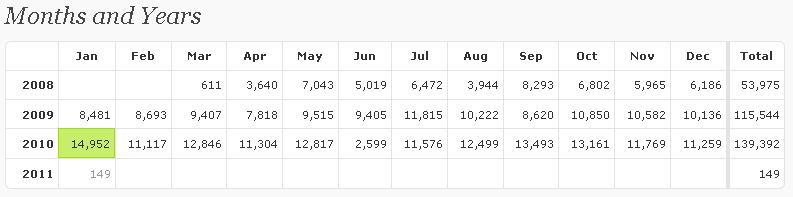
The Louvre Museum has 8.5 million visitors per year. This blog was viewed about 140,000 times in 2010. If it were an exhibit at The Louvre Museum, it would take 6 days for that many people to see it.

In 2010, there were 81 new posts, growing the total archive of this blog to 220 posts. There were 46 pictures uploaded, taking up a total of 5mb. That’s about 4 pictures per month.

The busiest day of the year was January 25th with 1709 views. The most popular post that day was Happy Republic Day.

Where did they come from?

The top referring sites in 2010 were google.co.in, google.com, en.wordpress.com, stackoverflow.com, and yandex.ru.

Some visitors came searching, mostly for sql server 2005 interview questions, republic day, dba responsibilities, error 18456, and system databases in sql server 2005.

Attractions in 2010

These are the posts and pages that got the most views in 2010.

1

Happy Republic Day January 2009
6 comments

2

How to change SQL Server Instance Name? September 2008
4 comments

3

SQL Server 2005 Interview Questions May 2008
62 comments

4

SQL Server 2008 Active-Passive/Active-Active Cluster Installation October 2009
14 comments

5

DBA Roles and Responsibilities December 2008
46 comments

Articles Posted on MSSQLTips.com

Database Administration
Dynamic Management Views\Functions
Monitoring
Security
SQL Server Management Studio
Tools

KILL SQL Server 2000 Blocking SPID and Records it details

Problem
Today I got an email from one of my blog reader; they have an application developed with VB6.0 and SQL Server 2000. Application was developed long back and now their database size is increased as well. Due un-efficient coding they are getting blocking issue and stuck all their application transactions. He asked for writing a query which will execute by SQL Server Agent at every 1 minute and will KILL the culprit SPID. He also wants me to store the KILL transaction history as well.

As a solution I have written below query for him and which working fine now.

-- Create below table in master database
 create table blkHistory
(
	SPID int,
	blocked int,
	killedSPID int,
	date datetime default getdate(),
	querytext varchar(8000)
)


-- add below code in to job command text box
declare @SPID as int,
        @blocked as int,
        @KilledSPID as int

declare @querytext as varchar(8000), @sql nvarchar(400)

select @SPID = spid,@blocked = blocked from sysprocesses where blocked <> 0

--select spid,blocked from sysprocesses where blocked <> 0

select @sql = 'KILL ' + cast (@blocked as nvarchar(100))

DECLARE @Handle binary(20)
SELECT @Handle = sql_handle FROM sysprocesses WHERE spid = @blocked

SELECT @querytext = text FROM ::fn_get_sql(@Handle)

EXECUTE sp_executesql @SQL

If @SPID > 0
begin
insert into blkHistory(SPID,blocked,KilledSPID,querytext)
values (@SPID,@blocked,@blocked,@querytext)
end

--you can use below query to retrieve datafrom blocking history
select * from master..blkHistory

Steps to insert error log records into temporary table

You can follow the below steps to enter error log records into temporary table and query it.

-- Command will create the temporary table in tempdb
CREATE TABLE [dbo].[#TmpErrorLog]
([LogDate] DATETIME NULL,
 [ProcessInfo] VARCHAR(20) NULL,
 [Text] VARCHAR(MAX) NULL ) ;

-- Command will insert the errorlog data into temporary table
INSERT INTO #TmpErrorLog ([LogDate], [ProcessInfo], [Text])
EXEC [master].[dbo].[xp_readerrorlog] 0 ;

-- retrieves the data from temporary table
SELECT * FROM #TmpErrorLog