Download Link
http://www.microsoft.com/downloads/en/details.aspx?FamilyID=65b81dce-db80-43f3-90e8-0753c751eaa7
SQL Server 2005/2008 built-in function LOGINPROPERTY can help us retrieve the important information of login properties.
We can retrieve the below important details using LOGINPROPERTY function.
1. Date of last password change
2. Login is locked or not
3. Loign password expired
4. Need to change password at next login or not
5. Count of consecutive failed login attempts
6. DateTime when the last login failed
7. DateTime when the login was locked out
8. Password hash
9. Returns the number of days until the password expires. LOGINPROPERTY(‘sa’, ‘DaysUntilExpiration’) argument is only available with SQL Server 2008
SELECT

name,

CASE LOGINPROPERTY(name, 'IsLocked')

WHEN 0 THEN 'No'

WHEN 1 THEN 'Yes'

ELSE 'Unknown'

END as IsAccountLocked,

LOGINPROPERTY(name, 'PasswordLastSetTime') as PasswordLastSetDate,

LOGINPROPERTY(name, 'BadPasswordCount') as CountOfFailedLoginAttempts,

LOGINPROPERTY(name, 'BadPasswordTime') as LastFailedLoginTime,

LOGINPROPERTY(name, 'LockoutTime') as LoginLockedOutDateTime,

CASE LOGINPROPERTY(name, 'IsExpired')

WHEN 0 THEN 'Password is not expired'

WHEN 1 THEN 'Password is not expired,change it'

ELSE 'Unknown'

END as PasswordExpired,

CASE LOGINPROPERTY(name, 'IsMustChange')

WHEN 0 THEN 'Must not change password at next login'

WHEN 1 THEN 'Must change password at next login'

ELSE 'Unknown'

END as PasswordChangeOnNextLogin,

LOGINPROPERTY(name, 'DaysUntilExpiration') as 'DaysUntilthePasswordExpires', --New Property in SQL Server 2008

LOGINPROPERTY(name, 'PasswordHash') as PasswordHash

From sys.sql_logins

order by name
Output

Execute the query againts sys.dm_os_performance_counters DMV to get the result.
SELECT * FROM sys.dm_os_performance_counters
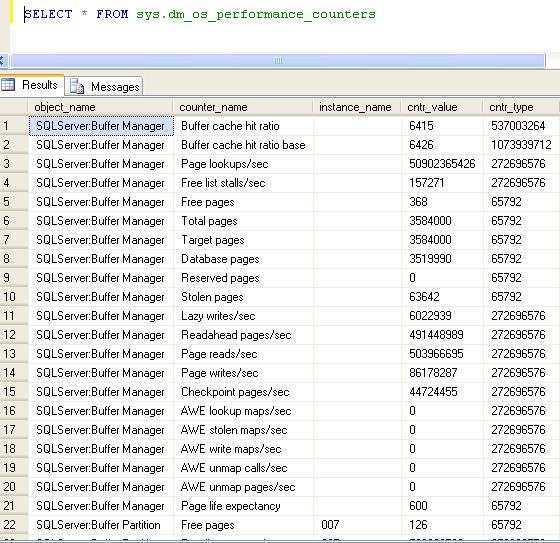
sys.dm_os_performance_counters output
Read Only
You can add the database in readonly mode by using below query. You can not add, update or delete any records once database is in read only mode.
ALTER DATABASE SQLDBPOOL set READ_ONLY
GO
READ_WRITE
You can set the database again in to Read/Write mode using below query.
ALTER DATABASE SQLDBPOOL SET READ_WRITE WITH NO_WAIT

GO
MSQL_XP
This kind of wait type occurs when a task is waiting for an extended stored procedure to end. SQL Server uses this wait state to detect potential MARS application deadlocks. The wait stops when the extended stored procedure call ends. In simple word SQL Server lost the control of extended stored procedure.
Few days back LiteSpeed backup job are running longer than normal, when I checked the process status using Activity Monitor, it shows processes are running but in MSQL_XIP wait state.
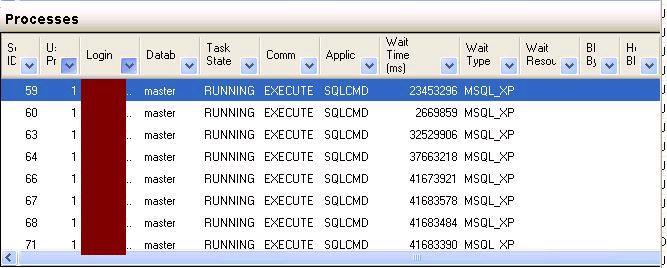
Activity Monitor
I tried to KILL the backup sessions and it gone into KILLED\RollBack state forever.
You can either reboot the server to free/terminate all the session or there is another way that you can find the SQL Server Backup Process associated Operating System Id.
You can follow the below steps to find out SPID related KPID
Step 1: Execute SP_WHO2 active command, you will SPID related KPID which is OS Process ID.
OR
Step 1: Check for DMVs to get the OS Process ID
Step 2: To get the more information regarding the OS Process download the Process Explorer from the below link.
http://technet.microsoft.com/en-us/sysinternals/bb896653.aspx
Step 3: Once confirmed you can kill OS process using Task Manager.
 aiDeeva.com