As SQL Server DBAs, many times we need to KILL all Open Sessions against the SQL Server Database to proceed with Maintenance Task, Restore and more…
You can use below different techniques to KILL all open sessions against the database.
Technique – I
Here we will query the SysProcesses table to get the session running against the user database and prepare the dynamic SQL statement to KILL all the connection.
DECLARE @DbName nvarchar(50)
SET @DbName = N'Write a DB Name here'

DECLARE @EXECSQL varchar(max)
SET @EXECSQL = ''

SELECT @EXECSQL = @EXECSQL + 'Kill ' + Convert(varchar, SPId) + ';'
FROM MASTER..SysProcesses
WHERE DBId = DB_ID(@DbName) AND SPId  @@SPId

EXEC(@EXECSQL)
Technique – II
Take the database into Single User Mode and execute all the task needs to perform against the databse.
ALTER DATABASE [Database Name] SET SINGLE_USER WITH ROLLBACK IMMEDIATE
Once you are finish with all the required task make the database accessible to everyone.
ALTER DATABASE [Database Name] SET MULTI_USER
Technique – III
In case of restore the database by replacing existing database, you can take the database OFFLINE and restore it. Restore will bring the database online.
ALTER DATABASE [Database Name] SET OFFLINE WITH ROLLBACK IMMEDIATE
ALTER DATABASE [Database Name] SET ONLINE
Technique – IV
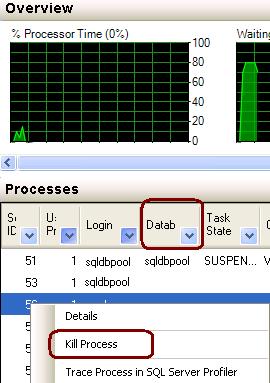
Go to Activity Monitor, Select the desired database and right click on the database to KILL the process.
 aiDeeva.com