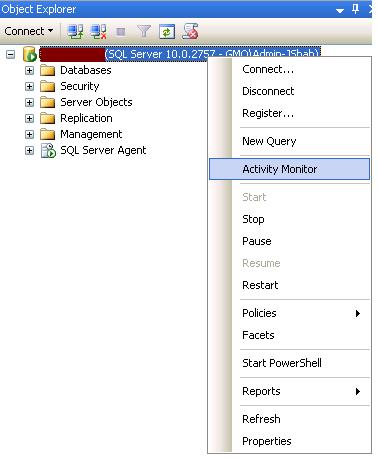
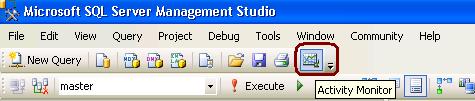
How to Open Activity Monitor from SSMS tool? Leave a reply To start Activity Monitor in SQL Server 2008 SSMS, right-click on the SQL Server name you want to monitor. From SQL Server 2008 Management Studio’s toolbar, click Activity Monitor as shown in the snippet below. 18.520469 73.856621 Share this: Share on Facebook (Opens in new window) Facebook Share on Tumblr (Opens in new window) Tumblr Share on LinkedIn (Opens in new window) LinkedIn Share on Reddit (Opens in new window) Reddit Print (Opens in new window) Print Share on X (Opens in new window) X Email a link to a friend (Opens in new window) Email Share on Pinterest (Opens in new window) Pinterest Like Loading... Related

 aiDeeva.com