Category Archives: SQL Server 2008 R2

Linked Server in SQL Server

A linked server configuration enables SQL Server to execute commands/T-SQL statements against OLE DB data sources on remote servers. You can query heterogeneous databases using linked server.

Advantage of Linked Server
Remote server access
You can execute distributed queries, updates, commands, and transactions on heterogeneous data sources using linked server
The ability to address diverse data sources similarly.


-- Below procedure will create linked server to communicate with access

Sp_addlinkedserver ‘Lnk_AccessDB’, ‘Access’, ‘Microsoft.Jet.OLEDB.4.0’,

‘c:\db1.mdb’

-- query the linked server

SELECT *

FROM   lnk_accessdb...tb1

-- Below query will drop the linked server

EXEC Sp_dropserver ‘Lnk_AccessDB’ 
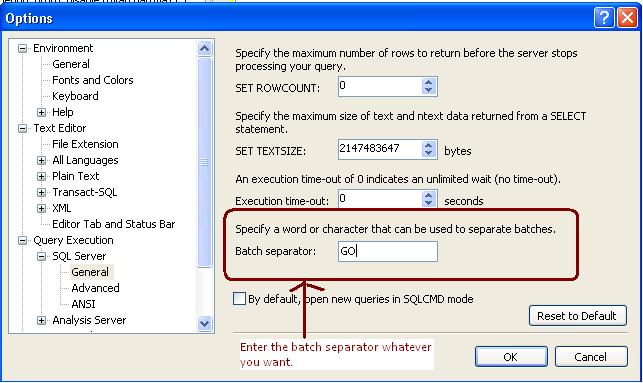
GO Keyword with Integer Parameter

In SQL Server the keyword GO tells SQL Server to execute the preceding code as one batch. From SQL Server 2005 onwards we can specify the integer parameter with GO keyword which will loop the preceding statement.

Example

create table jugal
(
name varchar(100) default ‘jugal shah’
)
— below command will insert the default value two times as we have specified 2 as parameter
insert into jugal values(default)
go 2

— below command will print ‘Jugal Shah’ 100 times as we have specified 100 as parameter
print ‘jugal shah’
go 100

Backup Start Date Time and Finish Date Time

As best practice it is recommended that you have to backup date time with the backup file name so anyone can get the idea of Backup creation.

Sometimes due some issue we took backup without specifying the datetime with the backup file name so during restore we are unsure that how much data backed up in the backup file, type of backup, Is it Copy only and more.

SQL Server stores the Backup Metadata into backup header. You can restore header only command to get the required information.

RESTORE headeronly FROM disk = ‘c:\jshah.bak’ 

Column Name Values Description
BackupName NULL  
BackupDescription NULL  
BackupType 1 Backup type:
1 = Database
2 = Transaction log
4 = File
5 = Differential database
6 = Differential file
7 = Partial
8 = Differential partial
ExpirationDate NULL  
Compressed 0 0 = Un-Compressed Backup
1 = Compressed Backup
Position 1  
DeviceType 2  
UserName JShah  
ServerName SQLDBPool  
DatabaseName jshah  
DatabaseVersion 655  
DatabaseCreationDate 12/31/10 9:55 AM  
BackupSize 1453056  
FirstLSN 28000000006000100  
LastLSN 28000000013000000  
CheckpointLSN 28000000006000100  
DatabaseBackupLSN 0  
BackupStartDate 12/31/10 10:06 AM  
BackupFinishDate 12/31/10 10:06 AM  
SortOrder 52  
CodePage 0  
UnicodeLocaleId 1033  
UnicodeComparisonStyle 196609  
CompatibilityLevel 100  
SoftwareVendorId 4608  
SoftwareVersionMajor 10  
SoftwareVersionMinor 0  
SoftwareVersionBuild 2757  
MachineName SQLDBPool  
Flags 512 1 = Log backup contains bulk-logged operations.
2 = Snapshot backup.
4 = Database was read-only when backed up.
8 = Database was in single-user mode when backed up.
16 = Backup contains backup checksums.
32 = Database was damaged when backed up, but the backup operation was requested to continue despite errors.
64 = Tail log backup.
128 = Tail log backup with incomplete metadata.
256 = Tail log backup with NORECOVERY.
BindingID 85A5505D-ADB1-4B33-A181-549DC520A0F8  
RecoveryForkID 03DE5437-1E27-4885-9011-91CFED12338A  
Collation SQL_Latin1_General_CP1_CI_AS  
FamilyGUID 03DE5437-1E27-4885-9011-91CFED12338A  
HasBulkLoggedData 0 1 = Yes
0 = No
IsSnapshot 0 1 = Yes
0 = No
IsReadOnly 0 1 = Yes
0 = No
IsSingleUser 0 1 = Yes
0 = No
HasBackupChecksums 0 1 = Yes
0 = No
IsDamaged 0 1 = Yes
0 = No
BeginsLogChain 0 1 = Yes
0 = No
HasIncompleteMetaData 0 1 = Yes
0 = No
IsForceOffline 0 1 = Yes
0 = No
IsCopyOnly 0 1 = Yes
0 = No
FirstRecoveryForkID 03DE5437-1E27-4885-9011-91CFED12338A  
ForkPointLSN NULL  
RecoveryModel FULL  
DifferentialBaseLSN NULL  
DifferentialBaseGUID NULL  
BackupTypeDescription Database  
BackupSetGUID 62EB4399-C119-42C2-91F1-BF0FF19CB896  
CompressedBackupSize 1453056  

How many databases can be mirrored on a single instance of Microsoft SQL Server?

It is frequently asked by the DBAs or SystemAdmins or Customer that how many databases can be mirrored on a single instance of Microsoft SQL Server?

Answer of the above question is you can configure 10 databases for 32-bit operating system.On a 32-bit system, database mirroring can support a maximum of about 10 databases per server instance because of the numbers of worker threads that are consumed by each database mirroring session.

For 64-Bit Operating system you can mirror more than 10 databases depending on the number of processors and worker threads. Many company has deployed more that 10 Databases as mirrored.