Category Archives: SQL Server 2008

Steps to restore the resource database

Few days back, I had discussion with my team member regarding the resource database and we all are curious to see the resource database.

As you all know resource database is hidden database and we can’t see it SQL Server. We follow below steps to restore the resource database and it worked. We can see the resource database.

Resource database file location
By default, these files are located in :\Program Files\Microsoft SQL Server\MSSQL.1\MSSQL\Data\. Each instance of SQL Server has one and only one associated mssqlsystemresource.mdf file, and instances do not share this file. In a cluster, the Resource database exists in the \Data folder on a shared disk.

Follow below steps if you want to see the resource database.
Step 1: Copy the resource database MDF/LDF file to different location and rename it. We have name both data and log file to resourcetest.

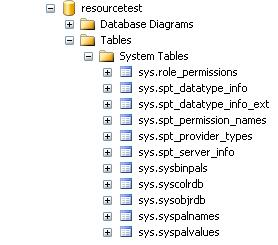
Step 2: Execute the below command to attach the resource database file and you can see the resource database.

USE [master]
GO
CREATE DATABASE [resourcetest] ON 
( FILENAME = N'J:\resourcetest.mdf' ),
( FILENAME = N'J:\resourcetest.ldf' )
 FOR ATTACH
GO

Resource Database Image

SQL Dependency Reporting

In SQL Server 2008 new Dynamic Management Functions and a System View introduced to keep track of Object Dependencies.

DMFs in SQL Server 2008 to keep track of object dependencies
sys.dm_sql_referenced_entities
sys.dm_sql_referencing_entities

System View in SQL Server 2008 to keep track of object dependencies
sys.sql_expression_dependencies

sys.sql_expression_dependencies: You can use the sys.sql_expression_dependencies catalog view to report dependency information for a given database. Cross-database entities are returned only when a valid four-part or three-part name is specified.

sys.dm_sql_referenced_entities: Return one row for each user-defined entity referenced by name in the definition of the specified referencing entity. The result set is limited to the entities that are referenced by the specified referencing entity.

sys.dm_sql_referencing_entities: You can use the sys.dm_sql_referencing_entities dynamic management function to return one row for each user-defined entity in the current database that references another user-defined entity by name.

Execute the below queries and check the output.

--create a sample database
create database db_pool
use db_pool
--create a sample table
create table tb1
(
	id int,
	name varchar(10)
)

insert into tb1 values(10,'Jugal')
go 50;

--create a procedure referencing tb1 table
CREATE procedure sp1
as 
	begin
		select * from DB_POOL.DBO.tb1
	end
	
exec sp1

SELECT @@SERVERNAME LocalServer,
               referenced_server_name,
               referenced_database_name,
               referenced_schema_name,
               referenced_entity_name
FROM sys.dm_sql_referenced_entities ('dbo.sp1','OBJECT')


SELECT *
FROM sys.dm_sql_referencing_entities ('dbo.TB1','OBJECT')


SELECT @@SERVERNAME LocalServer,
               referenced_server_name,
               referenced_database_name,
               referenced_schema_name,
               referenced_entity_name
FROM sys.dm_sql_referencing_entities ('dbo.sp1','OBJECT')

SELECT OBJECT_NAME(referencing_id) AS referencing_entity_name,
                referenced_database_name AS database_name,
                referenced_schema_name,
                referenced_entity_name
FROM sys.sql_expression_dependencies
WHERE referenced_entity_name = 'tb1'

select * 
FROM sys.sql_expression_dependencies

SELECT @@SERVERNAME LocalServer,
               OBJECT_NAME (referencing_id) referencing_object_name,
               referenced_server_name,
               referenced_database_name,
               referenced_schema_name,
               referenced_entity_name
FROM sys.sql_expression_dependencies 
where referenced_entity_name = 'tb1'


create procedure sp2
as
begin
   exec sp1
end

SELECT @@SERVERNAME LocalServer,
               OBJECT_NAME (referencing_id) referencing_object_name,
               referenced_server_name,
               referenced_database_name,
               referenced_schema_name,
               referenced_entity_name
FROM sys.sql_expression_dependencies 
where referenced_entity_name = 'sp1'

Standardize SQL Server Installations with Configuration Files

ProblemIf you have a requirement to install multiple SQL Server instances with the same settings, you most likely want to do it without following the numerous manual installation steps. The below tip will guide you through how to install a SQL Server instance with less effort.

Solution
http://www.mssqltips.com/sqlservertip/2511/standardize-sql-server-installations-with-configuration-files/

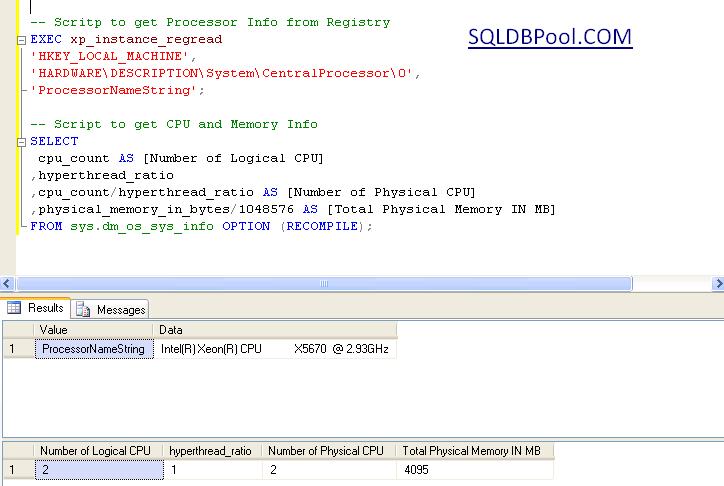
Script to get the CPU and Memory Information

You can execute the below script to get the processor and memory information.

-- Scritp to get Processor Info from Registry
EXEC xp_instance_regread
'HKEY_LOCAL_MACHINE',
'HARDWARE\DESCRIPTION\System\CentralProcessor\0',
'ProcessorNameString';

-- Script to get CPU and Memory Info
SELECT 
 cpu_count AS [Number of Logical CPU]
,hyperthread_ratio
,cpu_count/hyperthread_ratio AS [Number of Physical CPU]
,physical_memory_in_bytes/1048576 AS [Total Physical Memory IN MB]
FROM sys.dm_os_sys_info OPTION (RECOMPILE);

Customizing the Status Bar for each SQL Server Instance registered in CMS

Problem:
Steps to distinguish production and non-production SQL Servers registered in CMS while executing the query. Below article will guide you how to use customize colors in CMS.

Solution
To identify the production and non-production SQL Instances registered in CMS within the same group; you can use the Custom Color feature. In this article I will guide how to use to the custom color feature of CMS.

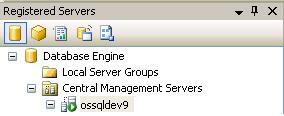
Step 1: Connect to Central Management Server (CMS) from SSMS.

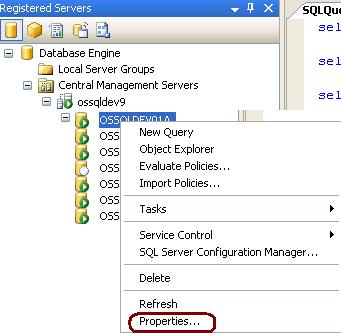
Step 2: Right click on the registered CMS server and select properties.

Step 3:Go to Connection Properties tab, checked the Use Custom color box and select the desired color. Click on Save to proceed.

Step 4: Right click on the SQL Instance and Open a new query window. You can see the blue color in the status bar. This way we can identify the production and non-production box. By specifying the custom colors.

Ouput Image of SSMS