You can use Server Property errorlogfilename to get the error log file path.
SELECT SERVERPROPERTY(‘ErrorLogFileName’)
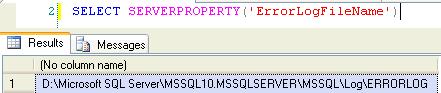
You can use Server Property errorlogfilename to get the error log file path.
SELECT SERVERPROPERTY(‘ErrorLogFileName’)
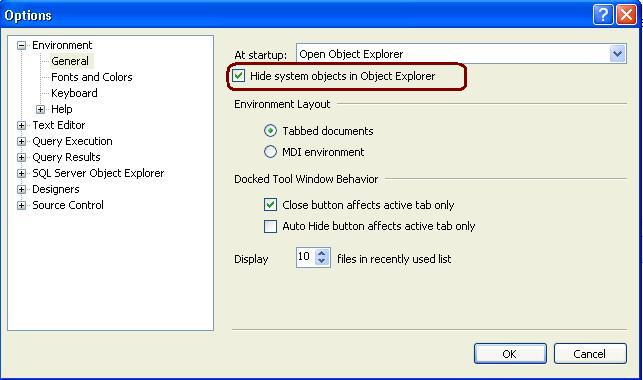
Open SSMS -> GO TO Tools -> Option and Check the below highlighted check box and restart the Management Studio. It will hide all the system objects in Object Explorer.
Setting up Log Shipping for SQL Server is not that difficult, but having a step by step process is helpful if this is the first time you have setup Log Shipping. In this tip we walk through the steps to setup Log Shipping.
To read the step by step Log-Shipping steps CLICK ME to read it.
Or Open http://mssqltips.com/tip.asp?tip=2301 link
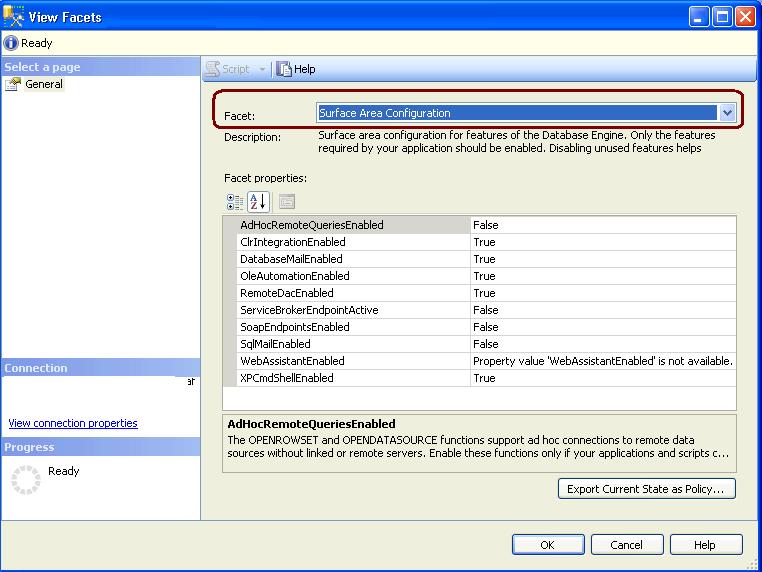
I got an email from one of my reader and He is asking me that where is SAC in SQL Server 2008. Microsoft has removed the Surface Area Configuration tool that was shipped in SQL Server 2005. The Services and Connections which were previously managed using Surface Area Configuration tool is now managed using the SQL Server Configuration Manager.
To manage the database engine features you have to use Policy Based Management. For that you have to use Surface Area Configuration facet.
You can follow below steps to configure the Database Engine features.
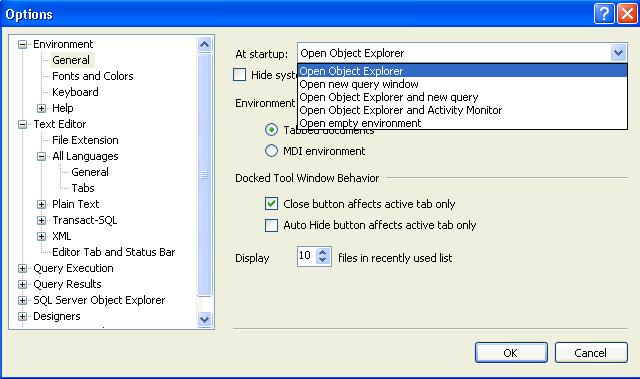
You can configure SSMS to startup with the below options. Default one is Open Object Explorer.
Go Tools –> Options –>Environment(page)–>General.
Options are self explanatory.
 aiDeeva.com