Get the list of System Stored Procedure
SELECT * FROM SYS.ALL_OBJECTS WHERE type='P' and object_id < 0
You can get the list of CLR procedures using below query
SELECT NAME FROM SYS.ALL_OBJECTS WHERE type='PC'
Get the list of System Stored Procedure
SELECT * FROM SYS.ALL_OBJECTS WHERE type='P' and object_id < 0
You can get the list of CLR procedures using below query
SELECT NAME FROM SYS.ALL_OBJECTS WHERE type='PC'
Steps to Run a Stored Procedure when SQL Server starts
As you all know, when SQL Server starts, it will first scan the registry to get the startup parameter values. By scaning registry it will find the master database files first and then make the master database online.
So if you want a procedure to execute when SQL Server starts automatically, you have to create that procedure in Master database only.
Step 1: Create a procedure in master database
Step 2: We have to use sp_procoption to set the stored procedure to execute when SQL Server service starts. Please see the example below.
EXEC sp_procoption 'procedure name', 'startup', 'true'
Step 3: Restart the SQL Service, to check the procedure output.
How turn off startup procedure?
You can turn-off the procedrue execution using below query.
EXEC sp_procoption 'procedure name', 'startup', 'false'
Problem
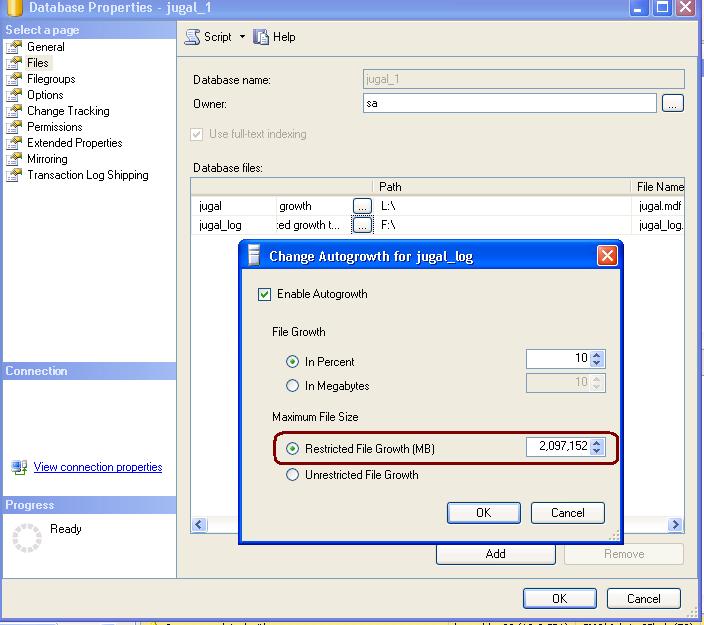
People often complains that they are unable to change the Log File Growth to un-restricted.
Solution
Whenever we are chaging max size as unlimited for log file, SQL Server reset the Max Size avalue to 2TB and this is the max size supported for log file. This is by design only.
Please check the below image for more detail.
SQL Server 2005/2008 built-in function LOGINPROPERTY can help us retrieve the important information of login properties.
We can retrieve the below important details using LOGINPROPERTY function.
1. Date of last password change
2. Login is locked or not
3. Loign password expired
4. Need to change password at next login or not
5. Count of consecutive failed login attempts
6. DateTime when the last login failed
7. DateTime when the login was locked out
8. Password hash
9. Returns the number of days until the password expires. LOGINPROPERTY(‘sa’, ‘DaysUntilExpiration’) argument is only available with SQL Server 2008
SELECT

name,

CASE LOGINPROPERTY(name, 'IsLocked')

WHEN 0 THEN 'No'

WHEN 1 THEN 'Yes'

ELSE 'Unknown'

END as IsAccountLocked,

LOGINPROPERTY(name, 'PasswordLastSetTime') as PasswordLastSetDate,

LOGINPROPERTY(name, 'BadPasswordCount') as CountOfFailedLoginAttempts,

LOGINPROPERTY(name, 'BadPasswordTime') as LastFailedLoginTime,

LOGINPROPERTY(name, 'LockoutTime') as LoginLockedOutDateTime,

CASE LOGINPROPERTY(name, 'IsExpired')

WHEN 0 THEN 'Password is not expired'

WHEN 1 THEN 'Password is not expired,change it'

ELSE 'Unknown'

END as PasswordExpired,

CASE LOGINPROPERTY(name, 'IsMustChange')

WHEN 0 THEN 'Must not change password at next login'

WHEN 1 THEN 'Must change password at next login'

ELSE 'Unknown'

END as PasswordChangeOnNextLogin,

LOGINPROPERTY(name, 'DaysUntilExpiration') as 'DaysUntilthePasswordExpires', --New Property in SQL Server 2008

LOGINPROPERTY(name, 'PasswordHash') as PasswordHash

From sys.sql_logins

order by name
Output

Peer-to-peer transactional replication
Peer-to-peer transactional replication allows you insert, update, or delete data at any node in a topology and have data changes propagated to the other nodes.
Because we can change data at any node, data changes at different nodes could conflict with each other.
In SQL Server 2008, peer-to-peer replication introduces the option to enable conflict detection across a peer-to-peer topology. This option helps us prevent the issues that are caused by undetected conflicts.
When we enable conflict detection, a conflicting change is considered a critical error that causes the Distribution Agent to fail. In the event of a conflict, the topology remains in an inconsistent state until the conflict is resolved and the data is made consistent across the topology.
To use conflict detection, all nodes must be running SQL Server 2008 or a later version, and detection must be enabled for all nodes. You can enable and disable detection in Management Studio either by using the Subscription Options page of the Publication Properties dialog box or the Configure Topology page of the Configure Peer-to-Peer Topology Wizard.
You can also enable and disable conflict detection by using the sp_addpublication or sp_configure_peerconflictdetection stored procedures.
Syntax
sp_configure_peerconflictdetection [ @publication= ] ‘publication’
[ , [ @action= ] ‘action’]
[ , [ @originator_id= ] originator_id ]
[ , [ @conflict_retention= ] conflict_retention ]
[ , [ @continue_onconflict= ] ‘continue_onconflict’]
[ , [ @local= ] ‘local’]
[ , [ @timeout= ] timeout ]
sp_help_peerconflictdetection stored procedure returns information about the conflict detection settings for a publication that is involved in a peer-to-peer transactional replication
topology.
 aiDeeva.com