
Wish you all very Happy Independence Day
1 Reply
SQL Server 2005 onward, we can create the roles in database. You can follow below simple script to grant the EXECUTE permission to user.
-- creating the database role
CREATE ROLE Database_Executor
-- granting the execute permission to database role
GRANT EXECUTE TO Database_Executor

-- Here I am granting the SQLDBPool login execute permission
USE [DBName]
GO
CREATE USER [SQLDBPool] FOR LOGIN [sqldbpool]
GO
USE [DBName]
GO
EXEC sp_addrolemember N'Database_Executor', N'sqldbpool'
GO
100 percent restored. [SQLSTATE 01000]
Processed 52345768 pages for database ‘SQLDBPool’, file ‘SQLDBPool_Data’ on file 1. [SQLSTATE 01000]
Processed 3045777 pages for database ‘SQLDBPool’, file ‘SQLDBPool_Log’ on file 1. [SQLSTATE 01000]
Many times you came across a situation where the Database restore is completed but you can see the restore command is running for a long time and your database status is restoring. We always want to know why database restore is taking so long time.
Let’s first check out what restore is doing internally. Restore session performs below three tasks while you execute the restore command.
The data copy phase involves copying all the data, log, and index pages from the backup of a database to the database files. After the completion of this phase SQL Server reports restore completes 100 percent.
In the Redo phase, all the committed transactions present in the transaction log when the database was backed up are rolled forward. It means all the committed transaction changes applied to the database. Still the database has un-committed transaction so database will be in unusable state.
In the Undo phase, all the uncommitted transactions in the transaction log while the database was backed up are rolled back. If the database is being restored with NORECOVERY, the Undo phase is skipped.
From the above explanation you can understand why the restore command is taking longer time after 100 percent completes.
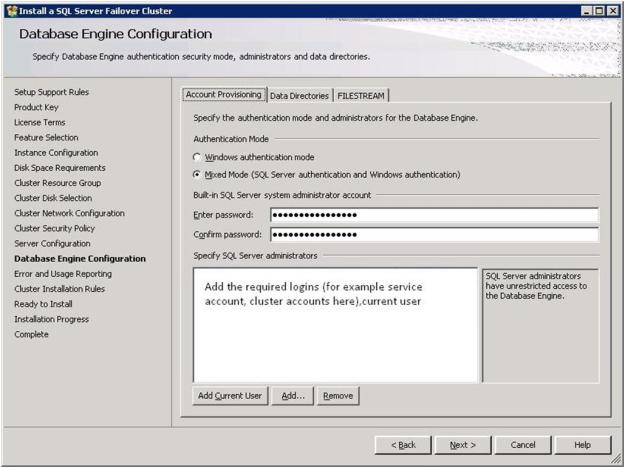
Many times I am getting a question from the SQL Server newbie, how to connect SQL Server after the installation. You can follow below tip to connect SQL Server. Before we start connect to SQL Server, let’s first go to SQL Server installation. During the installation of SQL Server you will come across the below step where you have to configure the SQL authentication mode.
Windows Authentication: Windows Authentication mode enables Windows Authentication and disables SQL Server Authentication. Using Windows Authentication windows and domain users can connect the SQL Server.
Mixed Mode Authentication: Mixed mode enables both Windows Authentication and SQL Server Authentication. SQL Authentication means SQL Login, Password etc will be managed by SQL Server its self by storing the login info into SQL Server Master database.
While installation if you have selected the mixed mode authentication, you have to specify the password of SA account which SQL Login with full control.
Once the SQL Server is installed click on the SQL Server Management Studio, It will show you the below screen. I have explain all the items in image to connect SQL Server.
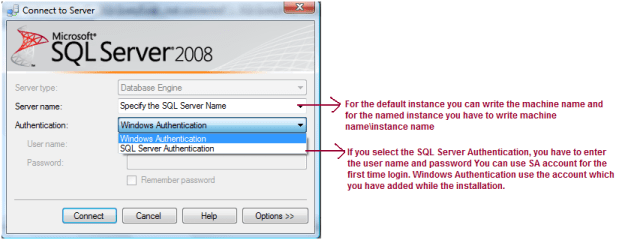
Now you are clear about the authentication
Follow below links to create the MS-DTC group on the cluster server.
 aiDeeva.com