How to rerun the SQL Agent job step automatically in case of failure?

How to rerun the SQL Agent job step automatically in case of failure?

Take an example of long running the job with the multiple steps where each steps has dependency of the previous steps successful execution. In case if any of the job step fails, entire job will fail and DBA has to manually run the job to complete it and job will run from the beginning.

There could be multiple reason of the job failure for example deadlock, network issue, requested backup file is not available as backup is still in progress etc.

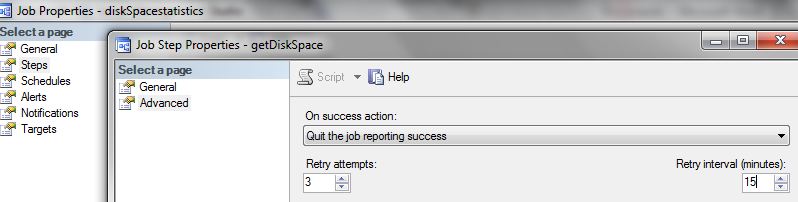
You can avoid this situation using he job step advanced option Retry Attempts and Retry Interval (minutes)

Before the job step considered to have failed, you can set the number of times that the job step should be repeated using “Retry attempts” option. You can also use the Retry interval (minutes) option the number of minutes interval between retry attempts.

Default value of “Retry attempts” and “Retry interval (minutes)” is 0

For example if I will specify the “Retry attempts” to 3 and “Retry interval (minutes)” to 15 minutes, job step will re-run of up to 3 failure at 15 minutes interval.
Capture

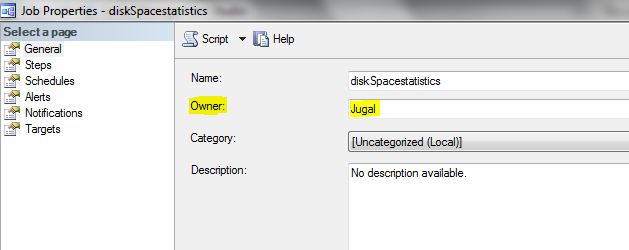
What is the role of job owner in SQL Server? How does it affect job?

role of job owner account

Capture

When SQL Server Agent run the schedule job it will check for the permission of the job owner, if job owner is non-sysadmin account, SQL Server logs into job using its own credential and switches the context of the job to non-sysadmin job owner account.

You can see the job history below message for the security context switch

Message
Executed as user: Jugal

If the job owner is sysAdmin account SQL Agent will run the job under its own security context, for example job owner is SA which is SQL Server Sysadmin account. You can see in the job history, SQL Server service account.

Executed as user: SQL Server Service account

It is recommended that individual user accounts should not be set as the owner of the agent jobs because of the security issue and to avoid the important job failures, in case individual account deleted or required permission revoked due to role change or account disable in active directory.

Instead of using individual user accounts as job owner dedicated account with the least privileges should be created to run SQL Server agent jobs.

Spinlocks lightweight synchronization primitives

Spinlocks are lightweight synchronization primitives which are used to protect access to data structures. Spinlocks are used to access data structures for a very short period of time. When a thread attempting to acquire a spinlock and if it is unable to obtain access it executes in a loop periodically checking to determine if the resource is available instead of immediately yielding.

After some period of time a thread waiting on a spinlock will yield before it is able to acquire the resource in order to allow other threads running on the same CPU to execute. This is known as a backoff.

When a large number of threads are contending for access to a single spinlock and it can lead to performance problems

You can use below DMV to get the SPIN LOCK information

select * from sys.dm_os_spinlock_stats

Examples
FGCP_PRP_FILL
OPT_IDX_STATS
BUF_FREE_LIST

Script to get data file size, used space and free space

While troubleshooting the disk space issue, you can use below script to check the data file size, used space and free size.

select 
		DBName,
		name,
		[filename],
		size as 'Size(MB)',
		usedspace as 'UsedSpace(MB)',
		(size - usedspace) as 'AvailableFreeSpace(MB)'
from		
(	
SELECT
db_name(s.database_id) as DBName,
s.name AS [Name],
s.physical_name AS [FileName],
(s.size * CONVERT(float,8))/1024 AS [Size],
(CAST(CASE s.type WHEN 2 THEN 0 ELSE CAST(FILEPROPERTY(s.name, 'SpaceUsed') AS float)* CONVERT(float,8) END AS float))/1024 AS [UsedSpace],
s.file_id AS [ID]
FROM
sys.filegroups AS g
INNER JOIN sys.master_files AS s ON ((s.type = 2 or s.type = 0) and s.database_id = db_id() and (s.drop_lsn IS NULL)) AND (s.data_space_id=g.data_space_id)
) DBFileSizeInfo