How to install IIS on Windows 7?

IIS is mandatory for the Virtual Server installation, in this article I will guide you how you can install the IIS on windows 7 or windows vista.


Step 1: click Start, and then click Control Panel
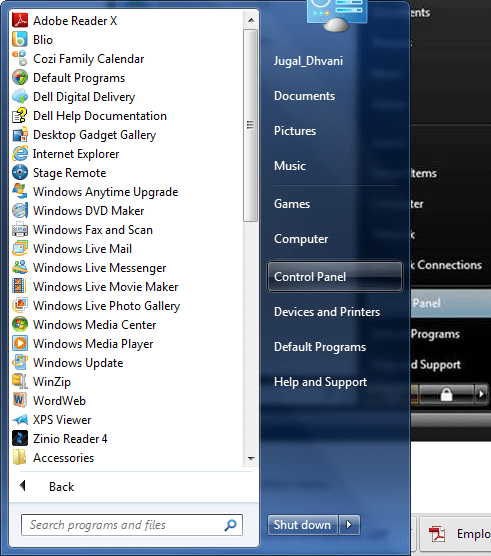


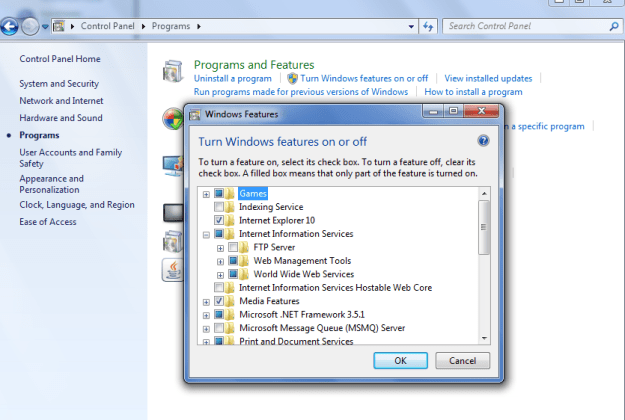
Step 2: In the Control Panel, click Programs then Click Turn Windows features on or off and from Windows Features dialog box Select Internet Information Services to choose the default features for installation.
What is “Null”? How much space “Null” value takes in SQL Server?

Null is neither zero nor empty string. Null is not a value at all. Most importantly for our discussion, one null value does not equal any other null value. In the RDBMS, Null simply means a value that is not known.

NULL value can occupy in the database based on the coulumn data type and width.

Fixed length data type NULL value takes the space as width of filed. (Char (5) – NULL value take 5 bytes)
Variable length data type NULL value takes 2 bytes. (varChar (5) – NULL value take 2 bytes)
Integer data type null value takes 4 bytes space

You can use the sparse columns to save the space of NULL values. http://technet.microsoft.com/en-us/library/cc280604.aspx

Script to find out Stored Procedures which are Using most resources

While doing the stored procedure performance tuning, you can use sys.dm_exec_procedure_stats DMV to get resource intensive procedures.

You can use the below script for it.

SELECT DB_NAME(database_id) AS DatabaseName
      ,OBJECT_SCHEMA_NAME(object_id,database_id) AS [SCHEMA_NAME] 
      ,OBJECT_NAME(object_id,database_id)AS [OBJECT_NAME]
      ,cached_time
      ,last_execution_time
      ,execution_count
      ,total_worker_time / execution_count AS Average_CPU
      ,total_elapsed_time / execution_count AS Average_Elapsed_Time
      ,total_logical_reads / execution_count AS Average_Logical_Reads
      ,total_logical_writes / execution_count AS Average_Logical_Writes
      ,total_physical_reads  / execution_count AS Average_Physical_Reads
FROM sys.dm_exec_procedure_stats 
where database_id <> 32767
ORDER BY Average_Logical_Reads DESC

SQL Server 2014 – Public CTP Now Available

You can download SQL Server 2014 CTP version from – http://technet.microsoft.com/en-US/evalcenter/dn205290.aspx

You can get the more information on SQL Server 2014 from http://blogs.technet.com/b/dataplatforminsider/archive/2013/06/25/sql-server-2014-public-ctp-now-available.aspx link

SQL Server 2014 only support x64 bit architecture.

SQL Server 2008: SQL Mail does not work with the 64-bit version of SQL Server (Microsoft SQL Server, Error: 17938)

Recently I got email from one of the blog reader that he is getting below error while setting up SQL MAIL as legacy feature in SQL Server 2008.

Error:
SQL Mail does not work with the 64-bit version of SQL Server (Microsoft SQL Server, Error: 17938)

Solution:
SQL Mail is not supported on 64-bit versions of SQL Server. SQL Mail stored procedures cannot be installed on 64-bit versions. If you want to still use it you have to go with the 32-bit edition or start using database mail, which is more easy.

Follow below article link to start converting your SQLMAIL to DB Mail.
http://msdn.microsoft.com/en-us/library/ms187891.aspx