T-SQL Script to find out the database file size, space used and available free space

While troubleshooting disk space issue, it is essential to know about the database file size statistics. You can execute below script to get database file size information.

set nocount on

create table #dbfileInfo(
name varchar(300),
location varchar(300),
filesizeMB decimal(9,2),
spaceUsedMB decimal(9,2),
FreespaceMB decimal(9,2))

declare @mySQL nvarchar(2000)
DECLARE @dbName varchar(MAX)
DECLARE @cur_DBName CURSOR

SET @cur_DBName = CURSOR FOR
select name from sys.databases

OPEN @cur_DBName
FETCH NEXT
FROM @cur_DBName INTO @dbName
WHILE @@FETCH_STATUS = 0
BEGIN
PRINT @dbName
if DATABASEPROPERTYEX(@dbName, 'status') = 'ONLINE'
begin
select @mySQL = 
    '
        use ' + @dbname + '
        INSERT INTO #dbfileInfo
        select
      name
    , filename
    , convert(decimal(12,2),round(a.size/128.000,2)) as FileSizeMB
    , convert(decimal(12,2),round(fileproperty(a.name,''SpaceUsed'')/128.000,2)) as SpaceUsedMB
    , convert(decimal(12,2),round((a.size-fileproperty(a.name,''SpaceUsed''))/128.000,2)) as FreeSpaceMB
    from dbo.sysfiles a
    '
    exec sp_executesql @mySQL
end
FETCH NEXT
FROM @cur_DBName INTO @dbName

END
CLOSE @cur_DBName
DEALLOCATE @cur_DBName
GO

select * from #dbfileInfo
drop table #dbfileInfo
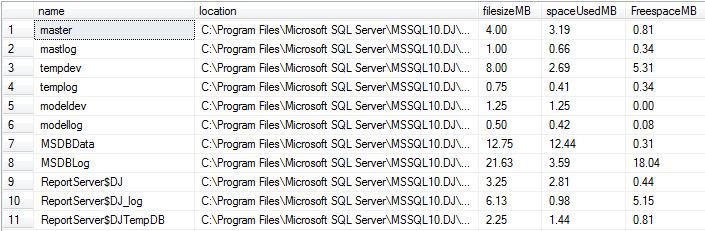
FileOutput

How to make Lite Speed Central database and Local repository in sync?

If you have configured the LiteSpeed in your environment using the Lite Speed Central repository option, there will be a scenario when Lite Speed Central repository misses some data. To make the data available in central repository you can use the LiteSpeed local database and execute the below procedure to ensure that cenral repository comes in sync with the local repository.

exec dbo.xp_replicate_activity_statistics

Permission required for SP_UpdateStats

To update the statistics on the database you should either be DBO of that database or SysAdmin on SQL instance.
SPUpdateStats

If you want to grant the least permission instead of server level permission you make the user DBO of the database. You can do it from database properties windows as below.

DBO

You can also make the user DBO using below command.

USE [My_Policy]
GO
EXEC dbo.sp_changedbowner @loginame = N’jugal’, @map = false
GO

ORIGINAL_LOGIN() and SUSER_SNAME() functions

ORIGINAL_LOGIN() function returns the name of the original login that connected to the instance of SQL Server and is used to identify original login in all sessions. Even though you will do the security context switch it will return the original login name.

SUSER_SNAME returns the name of user in the current security context.

--connect SQL Using LoginDEMO account
SELECT ORIGINAL_LOGIN() Original_Login_func, SUSER_SNAME() Suser_Name_Login_Func

--Executing query using LoginTest account
execute as login = 'LoginTest'
SELECT ORIGINAL_LOGIN() Original_Login_func, SUSER_SNAME() Suser_Name_Login_Func
revert

--Again executing query be reverting the change
SELECT ORIGINAL_LOGIN() Original_Login_func, SUSER_SNAME() Suser_Name_Login_Func

Check below output image for more information. I connected SQL Server using LoginDemo account.
New

Script to get the Last Backup Date of database full and t-log backup

To get the max backup date of the database or to check whether database is backed up or not. You can execute below script to check the last backup date.

SELECT   d.name,
         MAX(b.backup_finish_date) AS backupfinishdate
FROM     master.sys.sysdatabases d
         LEFT OUTER JOIN msdb..backupset b
         ON       b.database_name = d.name
         AND      b.type          = 'D'
GROUP BY d.name
ORDER BY backup_finish_date DESC


SELECT   d.name,
         MAX(b.backup_finish_date) AS backupfinishdate
FROM     master.sys.sysdatabases d
         LEFT OUTER JOIN msdb..backupset b
         ON       b.database_name = d.name
         AND      b.type          = 'L'
GROUP BY d.name
ORDER BY backup_finish_date DESC
