You can follow the below steps to change the password of the logged in account using RDP.
Step 1: Go to Start -> Windows Security
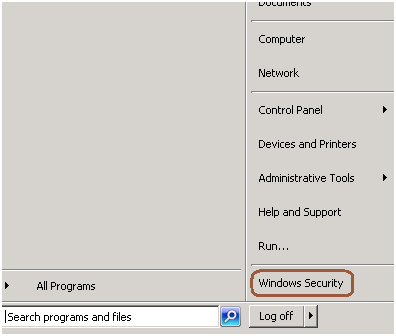
Step 2: Click on change password

Step 3: Change the password as mentioned in the below screen.

You can follow the below steps to change the password of the logged in account using RDP.
Step 1: Go to Start -> Windows Security
Step 2: Click on change password
Step 3: Change the password as mentioned in the below screen.
 aiDeeva.com
Thank you very much
And how do you do the same on Windows Server 2012?