Category Archives: SQL Server 2008

How to insert value into IDENTITY column?

If you will try to insert the value into Identity column you will get the one of the below error.

Error 1:
Msg 544, Level 16, State 1, Line 1
Cannot insert explicit value for identity column in table ‘Employee’ when IDENTITY_INSERT is set to OFF.

Error 2:
Error 8101 An explicit value for the identity column in table can only be specified when a column list is used and IDENTITY_INSERT is ON

Solution:
Write SET IDENTITY_INSERT table name ON before the insert script and SET IDENTITY_INSERT table name Off after insert script.

Example,

use db1

create table Employee
(
	myID int identity(100,1),
	name varchar(20)
)

insert into Employee(name) values('Jugal')

--if i will try to insert the value into Identity column it will fail
insert into Employee(myID,name) values (101,'DJ')

--you can add the data into identiy column by turning on the IDENTITY_INSERT ON

SET IDENTITY_INSERT Employee ON
	insert into Employee(myID,name) values (101,'DJ')
SET IDENTITY_INSERT Employee OFF

Performance Tuning – Wait Statistics

Many times we got a call from the business team regarding the performance issue on the database server. As a first step you can check for the blocking, if the blocking is not there. We have to check for the waits, Query is internally waiting for the resources to complete its process.

By identifying the correct wait type will give you the directions to troubleshooting issue further. You can execute below query to get the 10 wait statistics.

SELECT TOP 10
        wait_type ,
        max_wait_time_ms wait_time_ms ,
        signal_wait_time_ms ,
        wait_time_ms - signal_wait_time_ms AS resource_wait_time_ms ,
        100.0 * wait_time_ms / SUM(wait_time_ms) OVER ( )
                                    AS percent_total_waits ,
        100.0 * signal_wait_time_ms / SUM(signal_wait_time_ms) OVER ( )
                                    AS percent_total_signal_waits ,
        100.0 * ( wait_time_ms - signal_wait_time_ms )
        / SUM(wait_time_ms) OVER ( ) AS percent_total_resource_waits
FROM    sys.dm_os_wait_stats
WHERE   wait_time_ms > 0
ORDER BY wait_time_ms DESC

You have to checkout for the below kind of wait statistics and troubleshoot as per the stats.

CXPACKET :Most of the time it indicates nothing more than that certain queries are executing with parallelism; CXPACKET waits in the server are not an immediate sign of problems, it may be the symptom of another problem, associated with one of the other high value wait types in the instance.

SOS_SCHEDULER_YIELD :The tasks executing in the system are yielding the scheduler, having exceeded their quantum, and are having to wait in the runnable queue for other tasks to execute. This may indicate that the server is under CPU pressure.

THREADPOOL :A task had to wait to have a worker bound to it, in order to execute.

LCK_* :These wait types indicate that blocking is occurring in the system and that sessions have had to wait to acquire a lock of a specific type, which was being held by another database session. This problem can be investigated further using, for example, the information in the sys.dm_db_index_operational_stats.

PAGEIOLATCH_*, IO_COMPLETION, WRITELOG :These waits are commonly associated with disk I/O bottlenecks, though the root cause of the problem may be, and commonly is, a poorly performing query that is consuming excessive amounts of memory in the server.

PAGELATCH_* :Non-I/O waits for latches on data pages in the buffer pool. A lot of times PAGELATCH_* waits are associated with allocation contention issues. One of the best-known allocations issues associated with PAGELATCH_* waits occurs in tempdb when the a large number of objects are being created and destroyed in tempdb and the system experiences contention on the Shared Global Allocation Map (SGAM), Global Allocation Map (GAM), and Page Free Space (PFS) pages in the tempdb database.

LATCH_* :These waits are associated with lightweight short-term synchronization objects that are used to protect access to internal caches, but not the buffer cache. These waits can indicate a range of problems, depending on the latch type. Determining the specific latch class that has the most accumulated wait time associated with it can be found by querying the sys.dm_os_latch_stats DMV.

ASYNC_NETWORK_IO :This wait is often incorrectly attributed to a network bottleneck.

Different ways to check the SQL Server Instance Port number

Problem: If there are multiple SQL instances running on the same computer, it is difficult to identify the instance port number. You can use the below solution to find the instance specific port numbers.

Solution: You can check the list of port number used by the SQL Server instances using one of the below way.

Soln 1# Using SQL Server Configuration Manager

  • Go to SQL Server Configuration Manager
  • Select Protocols for SQL2005/2008 under SQL server Network Configuration
  • Right click on TCP/IP and select Properties
  • Select the IP Addresses-tab
  • In the section IP ALL, you can see the ports

Soln 2#From Registry Values
SQL Server 2005
Type the regedit command in Run window and check the below registry values.HKEY_LOCAL_MACHINE\SOFTWARE\Microsoft\Microsoft SQL Server\MSSQL.#

HKEY_LOCAL_MACHINE\SOFTWARE\Microsoft\Microsoft SQL Server\ MSSQL.#\ MSSQLServer\ SuperSocketNetLib\TCP\IPAll

SQL Server 2008
Default instance
HKEY_LOCAL_MACHINE\SOFTWARE\Microsoft\Microsoft SQL Server\MSSQL10.MSSQLSERVER\MSSQLServer\SuperSocketNetLib\TCP\IPAll

Named instance
HKEY_LOCAL_MACHINE\SOFTWARE\Microsoft\Microsoft SQL Server\MSSQL10.(InstanceName)\MSSQLServer\SuperSocketNetLib\TCP\IPAll

Soln 3# Error Log
Query the error log as below to get the port number.

EXEC xp_readerrorlog 0,1,”Server is listening on”,Null

Soln 4# Command Prompts
Execute the below command from the command prompt.

Netstat -abn

Basics of Replication Troubleshooting

There are many scenarios where you have been alerted for the replication failure and you have to troubleshoot the issue. In this article I will guide you what should be your approach to get the detailed error message and transaction details in replication.

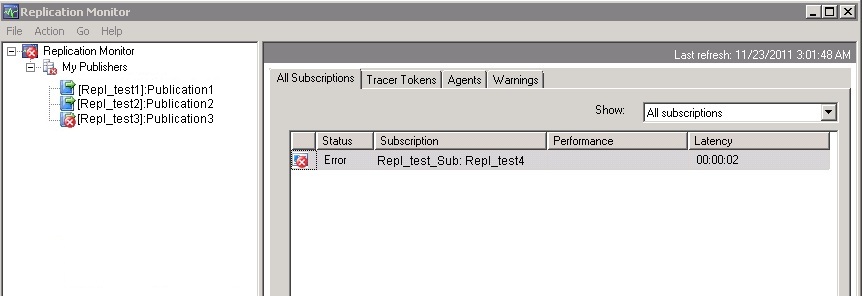
First check the replication monitor and click on the failed publisher. Next step is double click on the failed subscriber from All Subscriptions list.

Now next step is click on the error and check its description.
Error :
Command attempted:
if @@trancount > 0 rollback tran
(Transaction sequence number: 0x0000044100002D93000100000000, Command ID: 1)

From the above error message we have to identify which command is failed to execute on the subscriber.

To get the exact command, find out the distributer server and distribution database for the failed publisher.

Once you get the distribution database server, execute the below query against the distribution DB.

use distribution
go
SELECT * FROM msrepl_commands
WHERE xact_seqno = 0x0000044100002D93000100000000
AND command_id = 1

Once you execute the above query against the distribution database, you will get the more information about the error, for example Publisher database ID, Article ID and much more…

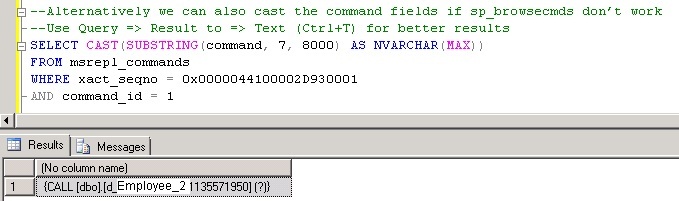
We have to use the above details, to get the exact command using either SP_BROWSEREPLCMDS (If CLR is enabled) or you can cast the command column in msrepl_commands table.

We will check both the alternatives.

Using SP_BROWSEREPLCMDS
Please note CLR must be enabled for to use this procedure.

EXEC SP_BROWSEREPLCMDS
@xact_seqno_start = '0x0000044100002D930001',
@xact_seqno_end = '0x0000044100002D930001',
@publisher_database_id = 1033,
@article_id = 12,
@command_id= 1

By casting command column in msrepl_commands table

Please note if you want to see the better output use the Result to Text as output in SSMS (CTRL + T)

SELECT CAST(SUBSTRING(command, 7, 8000) AS NVARCHAR(MAX))
FROM msrepl_commands
WHERE xact_seqno = 0x0000044100002D930001
AND command_id = 1

Now you got the exact SQL Command. As a next step check the objects from both the publisher and the subscriber to see the violation of the keys or do the data comparisons etc.

Different ways to monitor Log Shipping for SQL Server databases

Problem
Log shipping has been an option for creating a fail over server for SQL Server for quite some time. In this tip, we look at different ways that you can monitor the status of your log shipped databases.

Solution
http://www.mssqltips.com/sqlservertip/2553/different-ways-to-monitor-log-shipping-for-sql-server-databases/