Error
Msg 15291, Level 16, State 1, Procedure sp_change_users_login, Line 131
Terminating this procedure. The Login name ‘DJ’ is absent or invalid
What is Orphaned User?
An Orphaned User in SQL Server is a database user for which a valid SQL Server Login is not available or it is wrongly defined with the different SID in the SQL Server instance, thereby not allowing the user to get connect to the database to perform activities.
Below scenarios are mostly responsible for Orphan Users
1. A SQL Server Login was accidentally dropped
2. A database is restored with a copy of database from another SQL Server Instance
3. SID of the login is different in sys.server_principals and sys.sysusers
Steps to re-produce issue
Step 1: Creating database SQLDBPool
USE [master]

GO
CREATE DATABASE [sqldbpool] ON PRIMARY
( NAME = N’sqldbpool’, FILENAME = N’C:\sqldbpool.mdf’ , SIZE = 2048KB , MAXSIZE = UNLIMITED, FILEGROWTH = 1024KB )
LOG ON
( NAME = N’sqldbpool_log’, FILENAME = N’C:\sqldbpool_log.ldf’ , SIZE = 1024KB , MAXSIZE = 2048GB , FILEGROWTH = 10%)
COLLATE SQL_Latin1_General_CP1_CI_AS
GO
Step 2:
In this example I am creating user DJ using below script. You can also create user from GUI as well
Using GUI
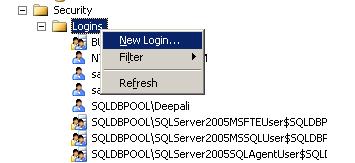
Right Click On Security Node and Select New Login
Using Script
USE [master]

GO

CREATE LOGIN [DJ] WITH PASSWORD=N'pune@123',

DEFAULT_DATABASE=[master],

CHECK_EXPIRATION=OFF,

CHECK_POLICY=OFF

GO
Step 3: I am assigning Data Reader and writer permission to Login DJ to database SQLDBPool
USE [sqldbpool]

GO

CREATE USER [DJ] FOR LOGIN [DJ]

GO

USE [sqldbpool]

GO

EXEC sp_addrolemember N'db_datawriter', N'DJ'

GO

USE [sqldbpool]

GO

EXEC sp_addrolemember N'db_denydatareader', N'DJ'

GO
Step 4: Dropping the login DJ and it will make the user DJ as orphan in SQLDBPool database
USE [master]

GO

DROP LOGIN [DJ]

GO
Steps to fix the issue
Step 1: You can use SP_CHANGE_USERS_LOGIN stored procedure to fix the Orphan user issue, for that you need the Database Owner permission on that database.
Syntax
sp_change_users_login [ @Action= ] 'action'

[ , [ @UserNamePattern= ] 'user' ]

[ , [ @LoginName= ] 'login' ]

[ , [ @Password= ] 'password' ]

[;]
Examples
EXEC sp_change_users_login 'Report' --Reports orphaned user

EXEC sp_change_users_login 'Auto_Fix', 'user' -- auto fix when SID mis-match issue

EXEC sp_change_users_login 'Auto_Fix', 'user', 'login', 'password'
The stored procedure SP_CHANGE_USERS_LOGIN accepts arguments AUTO_FIX, REPORT or UPDATE_ONE as @Action parameter.
AUTO_FIX: If this value is used for @Action parameter, it will create a SQL Server Login if it was not present earlier and will synchronize the SQL Server Login with that of the Database User.We have to also provide the password here.
REPORT: It will display the list of all the Orphaned Users along with the SID (Security Identifiers) value within the current database which are not linked to a SQL Server Login.
UPDATE_ONE:will synchronize the specified database user with an existing SQL Server Login.
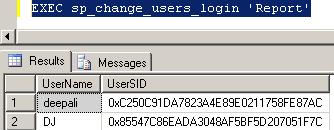
Step 2: As first step I am checking orphan user using Report parameter, it will show me the SID and orphan user name.

List of Orphaned User
Step 3: In this scenario we have dropped the SQL Login so it is required to create the login. We can create the login using below query specifying password and mapped it to orphan user
EXEC sp_change_users_login 'Auto_Fix', 'DJ', NULL, 'pune@123'
Step 4: Executing again the report query to list out orphan users.
EXEC sp_change_users_login 'Report'
Use below link to list out and fix the Orphan User issue for all the databases.
http://sqldbpool.com/2010/03/27/script-to-fix-and-list-out-orphan-users-on-all-the-databases-on-server/
18.520469
73.856621

 aiDeeva.com