Category Archives: SQL Server 2008

Important Trace Flags for DBA

A trace flag is used to set specific server characteristics or to switch off a particular behavior of the SQL Server.

You can enable the trace flag from Startup Parameters, Session and Global Session level.

DBCC TraceON(Flag Number) – at session level
DBCC TraceON(Flag Number, -1) -- Global

Trace Flag 610 : Minimally logged DML operations into Indexed tables, transaction log and allow bulk loading
Trace Flag 4199 : enable query optimizer fixes
Trace Flag 1222 : writes the deadlock information in XML format into error log
Trace flag 835 : Enable the Lock Pages in memory for standard edition
Trace flag 1118 : Directs SQL Server to allocate full extents to each tempDB objects
Trace flag 1204 : Write information about the deadlock in text format
Trace flag 1211 : Disable the lock escalation based on the memory pressure
Trace flag 3226 : Prevents successful backup operation being logged
Trace flag 3014 : Returns more information to error log about backup operation
Trace flag 3502 : Write information about the checkpoint in the error log
Trace flag 3505 : Disables automatic checkpoint
Trace flag 3004 : Returns more information about the instant file initialization
Trace flag 1806 : Disables the instant file initialization

How to monitor SQL Server Services of multiple instances?

Problem:
I have a need to monitor the SQL Server Services in my environment. Are there any programmatic options to do so? Check out this tip to learn more.

Solution:
http://www.mssqltips.com/sqlservertip/2867/steps-to-monitor-the-sql-server-services/

Get the List Of DBCC Commands & Syntax

If you don’t remember all the DBCC commands “NO Issue” execute the DBCC HELP command to get the list of all the DBCC.

DBCC HELP('?')

checkalloc
checkcatalog
checkconstraints
checkdb
checkfilegroup
checkident
checktable
cleantable
dbreindex
dropcleanbuffers
free
freeproccache
freesessioncache
freesystemcache
help
indexdefrag
inputbuffer
opentran
outputbuffer
pintable
proccache
show_statistics
showcontig
shrinkdatabase
shrinkfile
sqlperf
traceoff
traceon
tracestatus
unpintable
updateusage
useroptions

DBCC execution completed. If DBCC printed error messages, contact your system administrator.

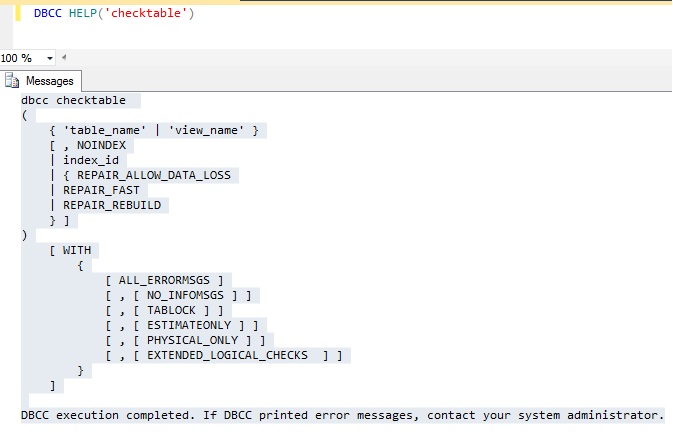
Don’t remember syntax, execute below command to get the syntax.

DBCC HELP('checktable')

DBCC

Script to get the SQL Agent Properties

You can use the sp_get_sqlagent_properties undocumented stored procedure to retrieve the SQL Agent properties of a SQL Instance. It is available in SQL Server MSDB database. This procedure only works if the SQL Agetn Service is started.

SQLAgent

Steps to Move SQL Server Log Shipping Secondary Database Files

Problem
With SQL Server is it possible to move the secondary database involved with Log Shipping to a different drive without disturbing the Log Shipping configuration? If so, what are the steps to accomplish this task? Check out this tip to learn more.

Solution
http://www.mssqltips.com/sqlservertip/2836/steps-to-move-sql-server-log-shipping-secondary-database-files/