Category Archives: SQL Server 2011 (Denali)

Steps to Check the Host Name for a Clustered SQL Server Instance

Problem
While troubleshooting a SQL Server cluster failover issue, it is essential to know the time needed for the cluster failover and the node name where SQL Server was running before the failover occurred. In this tip, I will show you the different options to find the failover time and node name where SQL Server was running before the failover over.

Solution
http://www.mssqltips.com/sqlservertip/2744/steps-to-check-the-host-name-for-a-clustered-sql-server-instance/

T-SQL Script to identify tables without Primary Key

When designing tables, It is a good practice of having one column that is unique and can be a primary key. You can include one of the below type column as Primary Key

– Add Auto Increment Column
– Identify the column which unique for all the rows

Make sure Primary keys should be as small as necessary. Prefer a numeric data type because numeric types are stored in a much more compact format than character formats. Most primary keys will be foreign keys in another table as well as used in multiple indexes. The smaller your key, the smaller the index, the less pages in the cache.

You can execute below script to identify the tables without Primary Key and add the Primary Key into tables as per the above suggestions..


Use <Database Name>

SELECT SCHEMA_NAME(schema_id) AS [Schema Name], name AS [Table Name]
FROM sys.tables
WHERE OBJECTPROPERTY(OBJECT_ID,'TableHasPrimaryKey') = 0
Order by name
GO

Saving changes is not permitted while modifying table design

Problem: There may be scenario while modifying the table design which needs to re-create the table. Even with the full permission while modifying it from SSMS, you get the below message and your table changes will be rolled back.

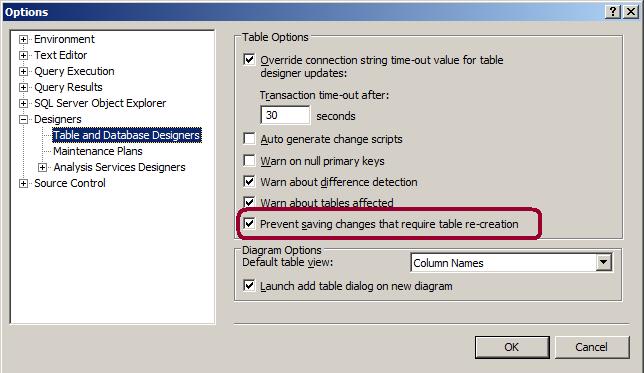
Saving changes is not permitted. The changes you have made require the following tables to be dropped and re-created. You have either made changes to a table that can’t be re-created or enabled the option Prevent saving changes that require the table to be re-created.

Solution:
Below are the few scenarios where changes in table design will re-create the table.

Changing the column data type
Changing the NULL property
Changing the order of the columns
Adding column before the last column
Changing the identity column property
Changing the computed column expression

Let’s see how can we fix the “Saving Changes is not permitted …”

Go to SSMS – Select Tools menu -> click on Options -> Go to Designers tab page -> Click on “table and database designers” page -> Un-check “Prevent Saving changes that require table re-creation” check box.