Category Archives: SQL Server

XP_LogEvent and RaiseError

xp_logevent
xp_logevent extended stored procedure is used to log the message into the SQL Server error log and event viewer application log.

Syntax
xp_logevent { error_number , ‘message’ } [ , ‘severity’ ]
Parameter Description
Error number Error number should be greater than 50000
Message Text you want to record in the error log and event viewer log
Severity Optional parameter (warning, informational or error) used to determine the type of error that will be logged in the NT application event log.

Than the question will arise in your mind what is the use of RAISERROR,  here is the difference between XP_LOGEVENT and RAISEERROR

XP_LOGEVENT RAISEERROR
Logs a user-defined message in the SQL Server log file and in the Windows Event Viewer. xp_logevent can be used to send an alert without sending a message to the client. Generates an error message. RAISERROR can either reference a user-defined message stored in the sys.messages view or build a message dynamically
Syntax
xp_logevent { error_number , ‘message’ } [ , ‘severity’ ]
Syntax
RAISERROR ( { msg_id | msg_str | @local_variable }
{ ,severity ,state }
[ ,argument [ ,…n ] ] )
[ WITH option [ ,…n ] ]
Does not return the error to the client application Does return the error to the client application
Does not change the value of @@error Does change the value of @@error
Can only be used to log the messages in the SQL Server error log and event viewer log Can use for error handling and RaiseError with log can perform the similar functionality to XP_LOGEVENT
Permission
Requires membership in the db_owner fixed database role in the master database, or membership in the sysadmin fixed server role.
Permission
Severity levels from 0 through 18 can be specified by any user. Severity levels from 19 through 25 can only be specified by members of the sysadmin fixed server role or users with ALTER TRACE permissions

Example

EXEC master..xp_logevent 50003, ‘Stored Procedure executed successfully’
Exec xp_readerrorlog –check the error message in error log or event viewer log

How to install IIS on Windows 7?

IIS is mandatory for the Virtual Server installation, in this article I will guide you how you can install the IIS on windows 7 or windows vista.


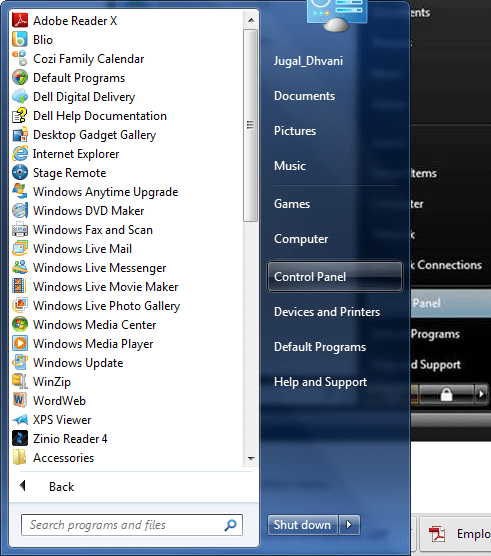
Step 1: click Start, and then click Control Panel


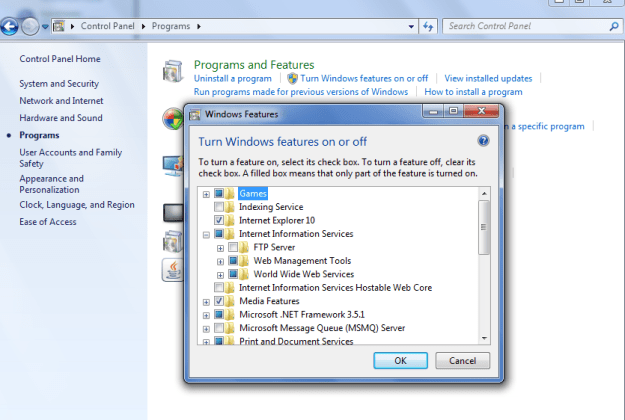
Step 2: In the Control Panel, click Programs then Click Turn Windows features on or off and from Windows Features dialog box Select Internet Information Services to choose the default features for installation.

T-SQL Script to find out the database file size, space used and available free space

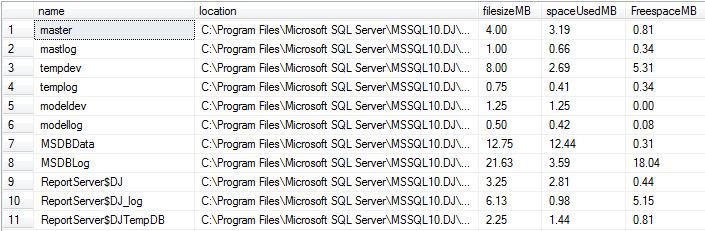
While troubleshooting disk space issue, it is essential to know about the database file size statistics. You can execute below script to get database file size information.

set nocount on

create table #dbfileInfo(
name varchar(300),
location varchar(300),
filesizeMB decimal(9,2),
spaceUsedMB decimal(9,2),
FreespaceMB decimal(9,2))

declare @mySQL nvarchar(2000)
DECLARE @dbName varchar(MAX)
DECLARE @cur_DBName CURSOR

SET @cur_DBName = CURSOR FOR
select name from sys.databases

OPEN @cur_DBName
FETCH NEXT
FROM @cur_DBName INTO @dbName
WHILE @@FETCH_STATUS = 0
BEGIN
PRINT @dbName
if DATABASEPROPERTYEX(@dbName, 'status') = 'ONLINE'
begin
select @mySQL = 
    '
        use ' + @dbname + '
        INSERT INTO #dbfileInfo
        select
      name
    , filename
    , convert(decimal(12,2),round(a.size/128.000,2)) as FileSizeMB
    , convert(decimal(12,2),round(fileproperty(a.name,''SpaceUsed'')/128.000,2)) as SpaceUsedMB
    , convert(decimal(12,2),round((a.size-fileproperty(a.name,''SpaceUsed''))/128.000,2)) as FreeSpaceMB
    from dbo.sysfiles a
    '
    exec sp_executesql @mySQL
end
FETCH NEXT
FROM @cur_DBName INTO @dbName

END
CLOSE @cur_DBName
DEALLOCATE @cur_DBName
GO

select * from #dbfileInfo
drop table #dbfileInfo

FileOutput

ORIGINAL_LOGIN() and SUSER_SNAME() functions

ORIGINAL_LOGIN() function returns the name of the original login that connected to the instance of SQL Server and is used to identify original login in all sessions. Even though you will do the security context switch it will return the original login name.

SUSER_SNAME returns the name of user in the current security context.

--connect SQL Using LoginDEMO account
SELECT ORIGINAL_LOGIN() Original_Login_func, SUSER_SNAME() Suser_Name_Login_Func

--Executing query using LoginTest account
execute as login = 'LoginTest'
SELECT ORIGINAL_LOGIN() Original_Login_func, SUSER_SNAME() Suser_Name_Login_Func
revert

--Again executing query be reverting the change
SELECT ORIGINAL_LOGIN() Original_Login_func, SUSER_SNAME() Suser_Name_Login_Func

Check below output image for more information. I connected SQL Server using LoginDemo account.
New