You can use the Win32_OperatingSystem class to get the Operating system info.
$hostname = "Enter Computer Name"
Get-WmiObject -class win32_operatingsystem -computer $hostname | select-object *
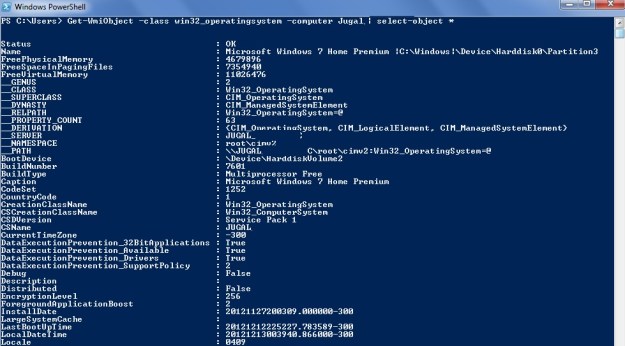
You can use the Win32_OperatingSystem class to get the Operating system info.
$hostname = "Enter Computer Name" Get-WmiObject -class win32_operatingsystem -computer $hostname | select-object *
CHOOSE function is the logical function. It is similar to SWITCH function in .NET. Choose function will return the item at the specified index from the list of values .
-- below query will return "SQLDBPool-2"as output
Select CHOOSE(2,'SQLDBPool','SQLDBPool-2','SQLDBPool-3')

-- below query will return "Thursday"as output
DECLARE @day as int
set @day = 5
SELECT Choose(@day,'Sunday','Monday', 'Tuesday', 'Wednesday','Thursday','Friday','Saturday')
Click Me to download sample database
It is always a risk if the user name & password is equal. You can run the below script to find out the list of User/Login name & password which are equal.
select
cast(@@SERVERNAME as varchar(150)) as SQLInstanceName
,name as [LoginName]
,'Password is same as Login Name' [Description]
from sys.syslogins
WHERE PWDCOMPARE (name,password) = 1
It is always good to have the idea about the database properties while doing the migration, performance tuning or configuration.
You can execute the below script to get the database property information.
select
 sysDB.database_id,
 sysDB.Name as 'Database Name',
 syslogin.Name as 'DB Owner',
 sysDB.state_desc,
 sysDB.recovery_model_desc,
 sysDB.collation_name,
 sysDB.user_access_desc,
 sysDB.compatibility_level,
 sysDB.is_read_only,
 sysDB.is_auto_close_on,
 sysDB.is_auto_shrink_on,
 sysDB.is_auto_create_stats_on,
 sysDB.is_auto_update_stats_on,
 sysDB.is_fulltext_enabled,
 sysDB.is_trustworthy_on
from sys.databases sysDB
INNER JOIN sys.syslogins syslogin ON sysDB.owner_sid = syslogin.sid
 aiDeeva.com