Insert data from one table to another table

You can insert the data from one table to another table using SELECT INTO and INSERT INTO with SELECT.. FROM clause.


— Below statement will create the temp table to insert records
select * INTO #tmpObjects from sys.sysobjects where type = ‘u’

— Below statement will create the user table to insert records.
— First will create the table and insert it details as well in new table
select * INTO tmpObjects from sys.sysobjects where type = ‘u’

–Below statement will insert new data into table
insert into tmpObjects SELECT * from sys.sysobjects where type = ‘s’
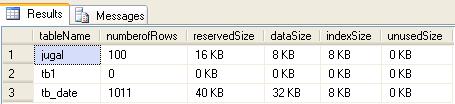
Display the size of all tables in Sql Server 2005

You can use sys.SP_SpaceUsed stored procedure to get the size of all the tables.

Below query will calulate the space of all the tables.
–create temp table to store the result
CREATE TABLE #temptable
  (
     tablename    VARCHAR(100),
     numberofrows VARCHAR(100),
     reservedsize VARCHAR(50),
     datasize     VARCHAR(50),
     indexsize    VARCHAR(50),
     unusedsize   VARCHAR(50)
  )

–Inserting into temp table

INSERT INTO #temptable
            (tablename,
             numberofrows,
             reservedsize,
             datasize,
             indexsize,
             unusedsize)

EXEC Sp_msforeachtable @command1=“EXEC sp_spaceused ‘?'”

SELECT *
FROM   #temptable

— drop the temporary table
DROP TABLE #temptable 


Size of All the tables


Linked Server in SQL Server

A linked server configuration enables SQL Server to execute commands/T-SQL statements against OLE DB data sources on remote servers. You can query heterogeneous databases using linked server.

Advantage of Linked Server
Remote server access
You can execute distributed queries, updates, commands, and transactions on heterogeneous data sources using linked server
The ability to address diverse data sources similarly.


-- Below procedure will create linked server to communicate with access

Sp_addlinkedserver ‘Lnk_AccessDB’, ‘Access’, ‘Microsoft.Jet.OLEDB.4.0’,

‘c:\db1.mdb’

-- query the linked server

SELECT *

FROM   lnk_accessdb...tb1

-- Below query will drop the linked server

EXEC Sp_dropserver ‘Lnk_AccessDB’ 

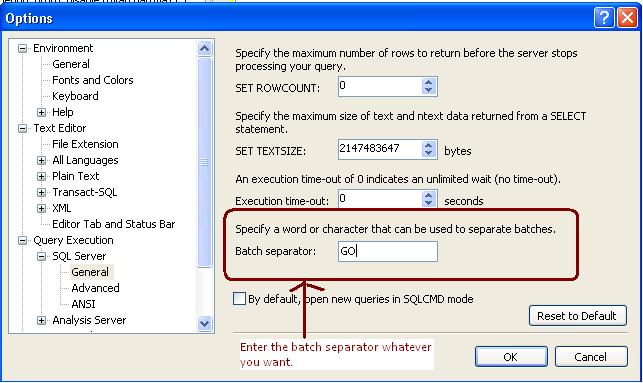
GO Keyword with Integer Parameter

In SQL Server the keyword GO tells SQL Server to execute the preceding code as one batch. From SQL Server 2005 onwards we can specify the integer parameter with GO keyword which will loop the preceding statement.

Example

create table jugal
(
name varchar(100) default ‘jugal shah’
)
— below command will insert the default value two times as we have specified 2 as parameter
insert into jugal values(default)
go 2

— below command will print ‘Jugal Shah’ 100 times as we have specified 100 as parameter
print ‘jugal shah’
go 100