Tag Archives: SQL Script

@@MICROSOFTVERSION Function

Problem: Take an example you are writing a script which is going to be deployed on the all the versions of SQL Servers and you want to check the SQL Server version details using T-SQL code. Below solution will guide you how to check the SQL Server version in stored procedure/t-sql batch.

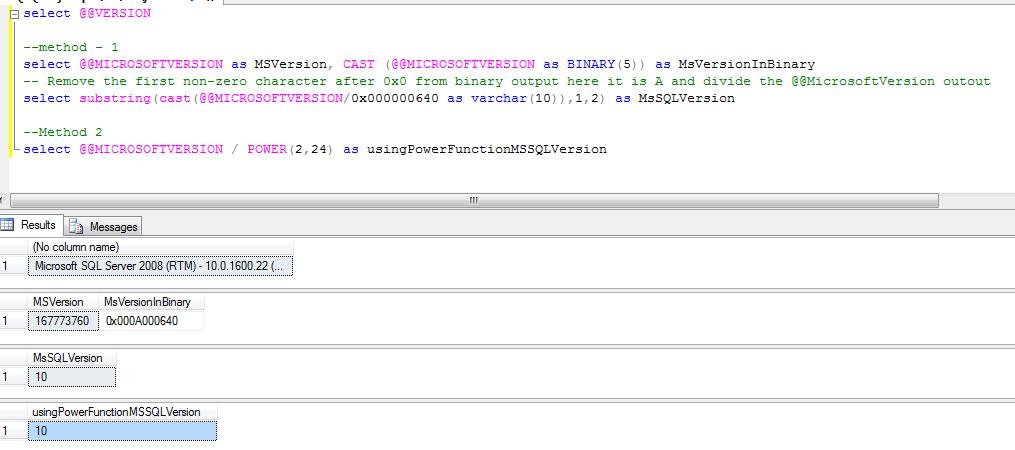
Solution: You can use the @@MICROSOFTVERSION to get the SQL Server version information. If the output of the below script is 9 than its SQL 2005, if 10 than SQL Server 2008 and if 11 than SQL Server 2011

select @@VERSION

--method - 1
select @@MICROSOFTVERSION as MSVersion, CAST (@@MICROSOFTVERSION as BINARY(5)) as MsVersionInBinary
-- Remove the first non-zero character after 0x0 from binary output here it is A and divide the @@MicrosoftVersion outout 
select substring(cast(@@MICROSOFTVERSION/0x000000640 as varchar(10)),1,2) as MsSQLVersion

--Method 2
select @@MICROSOFTVERSION / POWER(2,24) as usingPowerFunctionMSSQLVersion 

SP_Configure

Sp_Configure procedure is used to display or change the SQL Server setting. Once you execute the SP_Configure procedure it will display the below columns in the output.

name – Name of the configuration parameter
minimum – Minimum value setting that is allowed
maximum – Maximum value that is allowed
config_value – value which currently configured
run_value – value which currently running

How to update the configuration value?
Here I will show you how to enable the XP_CmdShell using SP_Configure. Please note don’t update configuration values until you are sure, otherwise it will affect the your SQL Server performance and behavioral.

--XP_Cmdshell is an andvanced option, enbale the advanced option
EXEC sp_configure 'show advanced options', 1
GO
--Enable the advance option
RECONFIGURE
GO
--enable the xp_cmdshell
EXEC sp_configure 'xp_cmdshell', 1
GO
--Reconfigure the xp_cmdshell value
RECONFIGURE
GO

What is the difference between Config_Value and Run_Value?

When we change the Configuration Parameter value as above it will update the Config_Value filed only, but wouldn’t be in effect until you run reconfigure command. Once the reconfigure command execute or SQL Server restarted, SQL Server will run as per the new configured value.

You can get the description of the configuration parameters from books online or you can query sys.configurations and check for the description column.

select
*
from
sys.configurations

Output of the Sp_Configure

Name

Minimum Maximum Value Run Value

access check cache bucket count

0

16384

0

0

access check cache quota

0

2147483647

0

0

Ad Hoc Distributed Queries

0

1

0

0

affinity I/O mask

-2147483648

2147483647

0

0

affinity mask

-2147483648

2147483647

0

0

Agent XPs

0

1

1

1

allow updates

0

1

0

0

awe enabled

0

1

0

0

backup compression default

0

1

0

0

blocked process threshold (s)

0

86400

0

0

c2 audit mode

0

1

0

0

clr enabled

0

1

0

0

common criteria compliance enabled

0

1

0

0

cost threshold for parallelism

0

32767

5

5

cross db ownership chaining

0

1

0

0

cursor threshold

-1

2147483647

-1

-1

Database Mail XPs

0

1

0

0

default full-text language

0

2147483647

1033

1033

default language

0

9999

0

0

default trace enabled

0

1

1

1

disallow results from triggers

0

1

0

0

EKM provider enabled

0

1

0

0

filestream access level

0

2

0

0

fill factor (%)

0

100

0

0

ft crawl bandwidth (max)

0

32767

100

100

ft crawl bandwidth (min)

0

32767

0

0

ft notify bandwidth (max)

0

32767

100

100

ft notify bandwidth (min)

0

32767

0

0

index create memory (KB)

704

2147483647

0

0

in-doubt xact resolution

0

2

0

0

lightweight pooling

0

1

0

0

locks

5000

2147483647

0

0

max degree of parallelism

0

64

0

0

max full-text crawl range

0

256

4

4

max server memory (MB)

16

2147483647

2147483647

2147483647

max text repl size (B)

-1

2147483647

65536

65536

max worker threads

128

32767

0

0

media retention

0

365

0

0

min memory per query (KB)

512

2147483647

1024

1024

min server memory (MB)

0

2147483647

0

0

nested triggers

0

1

1

1

network packet size (B)

512

32767

4096

4096

Ole Automation Procedures

0

1

0

0

open objects

0

2147483647

0

0

optimize for ad hoc workloads

0

1

0

0

PH timeout (s)

1

3600

60

60

precompute rank

0

1

0

0

priority boost

0

1

0

0

query governor cost limit

0

2147483647

0

0

query wait (s)

-1

2147483647

-1

-1

recovery interval (min)

0

32767

0

0

remote access

0

1

1

1

remote admin connections

0

1

0

0

remote login timeout (s)

0

2147483647

20

20

remote proc trans

0

1

0

0

remote query timeout (s)

0

2147483647

600

600

Replication XPs

0

1

0

0

scan for startup procs

0

1

0

0

server trigger recursion

0

1

1

1

set working set size

0

1

0

0

show advanced options

0

1

1

1

SMO and DMO XPs

0

1

1

1

SQL Mail XPs

0

1

0

0

transform noise words

0

1

0

0

two digit year cutoff

1753

9999

2049

2049

user connections

0

32767

0

0

user options

0

32767

0

0

xp_cmdshell

0

1

1

1

Script to Enable/Disable Database for Replication

You can enable the database for replication using below script.

use master
exec sp_replicationdboption @dbname = 'sqldbpool',
@optname = 'publish',
@value = 'true'
go

If you have restore the database on test environment and you are getting the error that “Database is part of Replication”, you can clear/disable it by executing below query.

use master
exec sp_replicationdboption @dbname = 'sqldbpool',
@optname = 'publish',
@value = 'false'
go

Script to find out Heap Table/Table without clustered Index

Heap Table: Table without a clustered index is called Heap Table. You can find out the Heap Table by querying the sys.indexes or sys.partitions against the index_id column.

select OBJECT_NAME(object_id),* 
from sys.indexes where index_id = 0

Select OBJECT_NAME(object_id),*  
from sys.partitions where index_id = 0

SQL Dependency Reporting

In SQL Server 2008 new Dynamic Management Functions and a System View introduced to keep track of Object Dependencies.

DMFs in SQL Server 2008 to keep track of object dependencies
sys.dm_sql_referenced_entities
sys.dm_sql_referencing_entities

System View in SQL Server 2008 to keep track of object dependencies
sys.sql_expression_dependencies

sys.sql_expression_dependencies: You can use the sys.sql_expression_dependencies catalog view to report dependency information for a given database. Cross-database entities are returned only when a valid four-part or three-part name is specified.

sys.dm_sql_referenced_entities: Return one row for each user-defined entity referenced by name in the definition of the specified referencing entity. The result set is limited to the entities that are referenced by the specified referencing entity.

sys.dm_sql_referencing_entities: You can use the sys.dm_sql_referencing_entities dynamic management function to return one row for each user-defined entity in the current database that references another user-defined entity by name.

Execute the below queries and check the output.

--create a sample database
create database db_pool
use db_pool
--create a sample table
create table tb1
(
	id int,
	name varchar(10)
)

insert into tb1 values(10,'Jugal')
go 50;

--create a procedure referencing tb1 table
CREATE procedure sp1
as 
	begin
		select * from DB_POOL.DBO.tb1
	end
	
exec sp1

SELECT @@SERVERNAME LocalServer,
               referenced_server_name,
               referenced_database_name,
               referenced_schema_name,
               referenced_entity_name
FROM sys.dm_sql_referenced_entities ('dbo.sp1','OBJECT')


SELECT *
FROM sys.dm_sql_referencing_entities ('dbo.TB1','OBJECT')


SELECT @@SERVERNAME LocalServer,
               referenced_server_name,
               referenced_database_name,
               referenced_schema_name,
               referenced_entity_name
FROM sys.dm_sql_referencing_entities ('dbo.sp1','OBJECT')

SELECT OBJECT_NAME(referencing_id) AS referencing_entity_name,
                referenced_database_name AS database_name,
                referenced_schema_name,
                referenced_entity_name
FROM sys.sql_expression_dependencies
WHERE referenced_entity_name = 'tb1'

select * 
FROM sys.sql_expression_dependencies

SELECT @@SERVERNAME LocalServer,
               OBJECT_NAME (referencing_id) referencing_object_name,
               referenced_server_name,
               referenced_database_name,
               referenced_schema_name,
               referenced_entity_name
FROM sys.sql_expression_dependencies 
where referenced_entity_name = 'tb1'


create procedure sp2
as
begin
   exec sp1
end

SELECT @@SERVERNAME LocalServer,
               OBJECT_NAME (referencing_id) referencing_object_name,
               referenced_server_name,
               referenced_database_name,
               referenced_schema_name,
               referenced_entity_name
FROM sys.sql_expression_dependencies 
where referenced_entity_name = 'sp1'