Author Archives: Jugal Shah

Unknown's avatar

About Jugal Shah

Jugal Shah has 19 plus years of experience in leading and managing the data and analytics practices. He has done the significant work in databases, analytics and generative AI projects. You can check his profile on http://sqldbpool.com/certificationawards/ URL.

How to check the Index Fragmentation in SQL Server?

Step 1: Launch SQL Server Management Studio.

Step 2: In the object explorer, right click on the database and select Reports -> Standard Reports -> Index Physical Statistics.

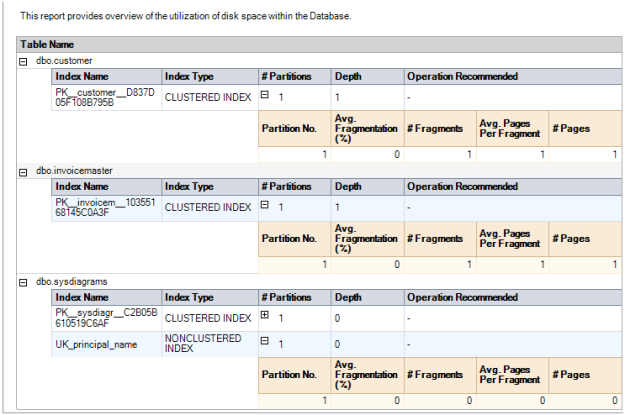
Step 3: SQL Server Management Studio will generate a report showing information about the Table Names, Index Names, Index Type, Number of Partitions and Operation Recommendations.

Step 4: Repeat the above steps to check the fragmentation of all user databases.
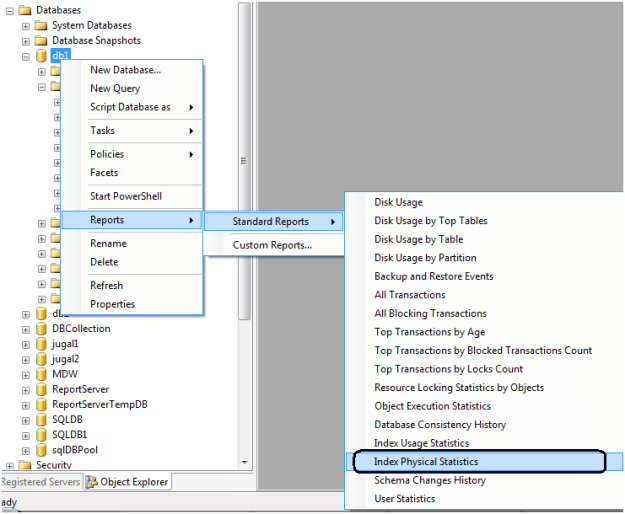
 

One key value that is provided in the report is the Operation Recommended field. Any value of Rebuild is an indication that the index is fragmented.

By expanding the # Partitions field, you can see the % of fragmentation for a given index.


Report looks like below.
How to use RunAs command for SSMS if option does not exist?

Problem

As a best practice in the industry, a DBA often has two logins that are used to access SQL Server; one is their normal Windows login and the other is an admin level login account which has sysAdmin rights on the SQL Server boxes. In addition most of the time the SQL Server client tools are only installed on the local desktop and not on the SQL Server Production Box. In order to use the different login to connect to SQL Server using SSMS you need to use the “Run as” feature. What do you do in the case of Windows 7 or Windows Vista where you can’t find the Run As Different User option.

Solution

http://www.mssqltips.com/sqlservertip/2617/how-to-use-runas-command-for-ssms-if-option-does-not-exist/