Category Archives: SQL Scripts

T-SQL Script to find out the database file size, space used and available free space

While troubleshooting disk space issue, it is essential to know about the database file size statistics. You can execute below script to get database file size information.

set nocount on

create table #dbfileInfo(
name varchar(300),
location varchar(300),
filesizeMB decimal(9,2),
spaceUsedMB decimal(9,2),
FreespaceMB decimal(9,2))

declare @mySQL nvarchar(2000)
DECLARE @dbName varchar(MAX)
DECLARE @cur_DBName CURSOR

SET @cur_DBName = CURSOR FOR
select name from sys.databases

OPEN @cur_DBName
FETCH NEXT
FROM @cur_DBName INTO @dbName
WHILE @@FETCH_STATUS = 0
BEGIN
PRINT @dbName
if DATABASEPROPERTYEX(@dbName, 'status') = 'ONLINE'
begin
select @mySQL = 
    '
        use ' + @dbname + '
        INSERT INTO #dbfileInfo
        select
      name
    , filename
    , convert(decimal(12,2),round(a.size/128.000,2)) as FileSizeMB
    , convert(decimal(12,2),round(fileproperty(a.name,''SpaceUsed'')/128.000,2)) as SpaceUsedMB
    , convert(decimal(12,2),round((a.size-fileproperty(a.name,''SpaceUsed''))/128.000,2)) as FreeSpaceMB
    from dbo.sysfiles a
    '
    exec sp_executesql @mySQL
end
FETCH NEXT
FROM @cur_DBName INTO @dbName

END
CLOSE @cur_DBName
DEALLOCATE @cur_DBName
GO

select * from #dbfileInfo
drop table #dbfileInfo
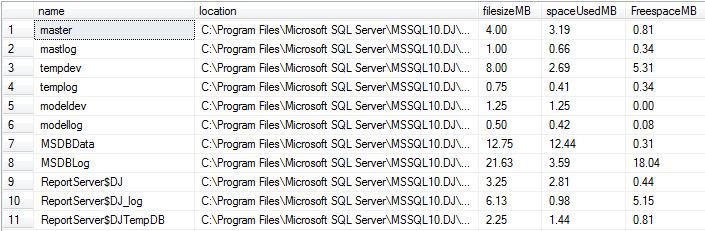
FileOutput

ORIGINAL_LOGIN() and SUSER_SNAME() functions

ORIGINAL_LOGIN() function returns the name of the original login that connected to the instance of SQL Server and is used to identify original login in all sessions. Even though you will do the security context switch it will return the original login name.

SUSER_SNAME returns the name of user in the current security context.

--connect SQL Using LoginDEMO account
SELECT ORIGINAL_LOGIN() Original_Login_func, SUSER_SNAME() Suser_Name_Login_Func

--Executing query using LoginTest account
execute as login = 'LoginTest'
SELECT ORIGINAL_LOGIN() Original_Login_func, SUSER_SNAME() Suser_Name_Login_Func
revert

--Again executing query be reverting the change
SELECT ORIGINAL_LOGIN() Original_Login_func, SUSER_SNAME() Suser_Name_Login_Func

Check below output image for more information. I connected SQL Server using LoginDemo account.
New

Script to get the database backup history

For the point time recovery or in case of failure it is essential that you should have the backup history of the database. You can execute the below query against the database to get the backup history.

SELECT  
   CONVERT(CHAR(100), SERVERPROPERTY('Servername')) AS Server, 
   msdb.dbo.backupset.database_name,  
   msdb.dbo.backupset.backup_start_date,  
   msdb.dbo.backupset.backup_finish_date, 
   msdb.dbo.backupset.expiration_date, 
   CASE msdb..backupset.type  
       WHEN 'D' THEN 'Database'  
       WHEN 'L' THEN 'Log'  
   END AS backup_type,  
   msdb.dbo.backupmediafamily.logical_device_name,  
   msdb.dbo.backupmediafamily.physical_device_name,   
   msdb.dbo.backupset.name AS backupset_name, 
   msdb.dbo.backupset.description 
FROM   msdb.dbo.backupmediafamily  
   INNER JOIN msdb.dbo.backupset ON msdb.dbo.backupmediafamily.media_set_id = msdb.dbo.backupset.media_set_id 
WHERE 
(CONVERT(datetime, msdb.dbo.backupset.backup_start_date, 102) >= '2013-01-08 00:04:49.000')  and (CONVERT(datetime, msdb.dbo.backupset.backup_start_date, 102) <= '2013-01-08 23:59:59')  
and  msdb.dbo.backupset.database_name = 'Mention the database name'
ORDER BY  
   msdb.dbo.backupset.backup_finish_date desc

Get the List Of DBCC Commands & Syntax

If you don’t remember all the DBCC commands “NO Issue” execute the DBCC HELP command to get the list of all the DBCC.

DBCC HELP('?')

checkalloc
checkcatalog
checkconstraints
checkdb
checkfilegroup
checkident
checktable
cleantable
dbreindex
dropcleanbuffers
free
freeproccache
freesessioncache
freesystemcache
help
indexdefrag
inputbuffer
opentran
outputbuffer
pintable
proccache
show_statistics
showcontig
shrinkdatabase
shrinkfile
sqlperf
traceoff
traceon
tracestatus
unpintable
updateusage
useroptions

DBCC execution completed. If DBCC printed error messages, contact your system administrator.

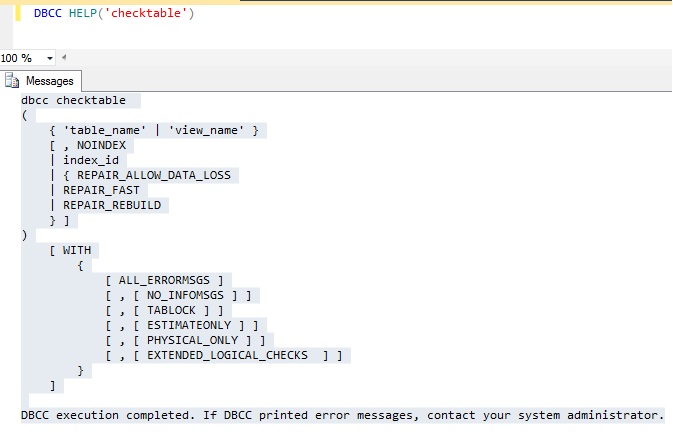
Don’t remember syntax, execute below command to get the syntax.

DBCC HELP('checktable')

DBCC