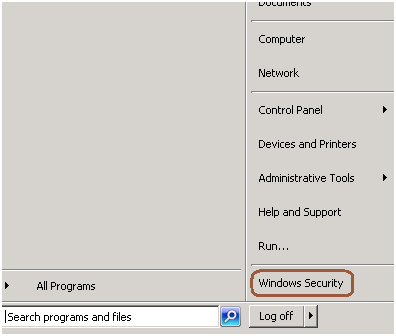
You can follow the below steps to change the password of the logged in account using RDP.
Step 1: Go to Start -> Windows Security
Step 2: Click on change password
Step 3: Change the password as mentioned in the below screen.

You can follow the below steps to change the password of the logged in account using RDP.
Step 1: Go to Start -> Windows Security
Step 2: Click on change password
Step 3: Change the password as mentioned in the below screen.

Problem
Recently I moved PowerShell script files to a production environment and when executing it from the command prompt, I got this error: “File cannot be loaded because the execution of scripts is disabled on this system. Please see “get-help about_signing” for more details”. In this tip we cover what needs to be done to resolve this issue.
Solution
http://www.mssqltips.com/sqlservertip/2702/setting-the-powershell-execution-policy/
In SQL Server a view represents a virtual table. Just like a real table, a view consists of rows with columns, and you can retrieve data from a view (even you can INSERT/UPDATE/DELETE data in a view). The fields in the view’s virtual table are the fields of one or more real tables in the database. You can use views to join two tables in your database and present the underlying data as if the data were coming from a single table, thus simplifying the schema of your database for users performing ad-hoc reporting. You can also use views as a security mechanism to restrict the data available to end users
See the below example how we can make the view read only.
--creating a sample table Create table tbl1 ( myID int, name varchar(10) ) --inserting data insert into tbl1 values(1,'Jugal'),(2,'SQL'),(3,'DBPool') --creating sample view create view vwtbl1 as select * from tbl1 --inserting data using view insert into vwtbl1 values(1,'Jugal'),(2,'SQL'),(3,'DBPool') --altering view to make it readOnly alter view vwtbl1 as select myid,name from tbl1 union all select 0,0 where 1 =0
INSERT/UPDATE/DELETE will fail with the below errors.
Msg 4406, Level 16, State 1, Line 1
Update or insert of view or function 'vwtbl1' failed because it contains a derived or constant field.
Msg 4426, Level 16, State 1, Line 1
View 'vwtbl1' is not updatable because the definition contains a UNION operator.
Problem
Recently I experienced a situation where a SQL Server login failed with this error message:
Error: 18456, Severity: 14, State: 10.
Login failed for user ‘SQL_Login’. Reason: Password validation failed with an infrastructure error. Check for previous errors. [CLIENT: XXX.XXX.XXX.XXX].
Can you help me decipher this SQL Server issue and correct it? Check out this tip to learn more.
Compound Primary key is a primary key which is created on more than one column. Now the questions is how to create the foreign key for the compound primary key where it references more than one column.
Check the below example.
create table employee
(
empID int not null,
SSN int not null,
name varchar(20)
)
ALTER TABLE [employee]
ADD CONSTRAINT pk_employee PRIMARY KEY (empID, SSN)
create table EmpDetail
(
empID int,
SSN int,
address varchar(20),
city varchar(20),
pin varchar(20)
)
ALTER TABLE dbo.empDetail
ADD CONSTRAINT FK_Employee
FOREIGN KEY(empID, SSN)
REFERENCES dbo.employee(empID, SSN)
SELECT
tc.TABLE_NAME,
tc.CONSTRAINT_NAME,
ccu.COLUMN_NAME
FROM
INFORMATION_SCHEMA.TABLE_CONSTRAINTS tc
INNER JOIN
INFORMATION_SCHEMA.CONSTRAINT_COLUMN_USAGE ccu
ON ccu.TABLE_NAME = tc.TABLE_NAME AND ccu.CONSTRAINT_NAME = tc.CONSTRAINT_NAME
WHERE
tc.TABLE_NAME IN ('employee','employeeDetail')