Category Archives: SQL Server 2012

Script to find out Stored Procedures which are Using most resources

While doing the stored procedure performance tuning, you can use sys.dm_exec_procedure_stats DMV to get resource intensive procedures.

You can use the below script for it.

SELECT DB_NAME(database_id) AS DatabaseName
      ,OBJECT_SCHEMA_NAME(object_id,database_id) AS [SCHEMA_NAME] 
      ,OBJECT_NAME(object_id,database_id)AS [OBJECT_NAME]
      ,cached_time
      ,last_execution_time
      ,execution_count
      ,total_worker_time / execution_count AS Average_CPU
      ,total_elapsed_time / execution_count AS Average_Elapsed_Time
      ,total_logical_reads / execution_count AS Average_Logical_Reads
      ,total_logical_writes / execution_count AS Average_Logical_Writes
      ,total_physical_reads  / execution_count AS Average_Physical_Reads
FROM sys.dm_exec_procedure_stats 
where database_id <> 32767
ORDER BY Average_Logical_Reads DESC
Script to get the Last Backup Date of database full and t-log backup

To get the max backup date of the database or to check whether database is backed up or not. You can execute below script to check the last backup date.

SELECT   d.name,
         MAX(b.backup_finish_date) AS backupfinishdate
FROM     master.sys.sysdatabases d
         LEFT OUTER JOIN msdb..backupset b
         ON       b.database_name = d.name
         AND      b.type          = 'D'
GROUP BY d.name
ORDER BY backup_finish_date DESC


SELECT   d.name,
         MAX(b.backup_finish_date) AS backupfinishdate
FROM     master.sys.sysdatabases d
         LEFT OUTER JOIN msdb..backupset b
         ON       b.database_name = d.name
         AND      b.type          = 'L'
GROUP BY d.name
ORDER BY backup_finish_date DESC

Script to get the database backup history

For the point time recovery or in case of failure it is essential that you should have the backup history of the database. You can execute the below query against the database to get the backup history.

SELECT  
   CONVERT(CHAR(100), SERVERPROPERTY('Servername')) AS Server, 
   msdb.dbo.backupset.database_name,  
   msdb.dbo.backupset.backup_start_date,  
   msdb.dbo.backupset.backup_finish_date, 
   msdb.dbo.backupset.expiration_date, 
   CASE msdb..backupset.type  
       WHEN 'D' THEN 'Database'  
       WHEN 'L' THEN 'Log'  
   END AS backup_type,  
   msdb.dbo.backupmediafamily.logical_device_name,  
   msdb.dbo.backupmediafamily.physical_device_name,   
   msdb.dbo.backupset.name AS backupset_name, 
   msdb.dbo.backupset.description 
FROM   msdb.dbo.backupmediafamily  
   INNER JOIN msdb.dbo.backupset ON msdb.dbo.backupmediafamily.media_set_id = msdb.dbo.backupset.media_set_id 
WHERE 
(CONVERT(datetime, msdb.dbo.backupset.backup_start_date, 102) >= '2013-01-08 00:04:49.000')  and (CONVERT(datetime, msdb.dbo.backupset.backup_start_date, 102) <= '2013-01-08 23:59:59')  
and  msdb.dbo.backupset.database_name = 'Mention the database name'
ORDER BY  
   msdb.dbo.backupset.backup_finish_date desc

How to monitor SQL Server Services of multiple instances?

Problem:
I have a need to monitor the SQL Server Services in my environment. Are there any programmatic options to do so? Check out this tip to learn more.

Solution:
http://www.mssqltips.com/sqlservertip/2867/steps-to-monitor-the-sql-server-services/

Get the List Of DBCC Commands & Syntax

If you don’t remember all the DBCC commands “NO Issue” execute the DBCC HELP command to get the list of all the DBCC.

DBCC HELP('?')

checkalloc
checkcatalog
checkconstraints
checkdb
checkfilegroup
checkident
checktable
cleantable
dbreindex
dropcleanbuffers
free
freeproccache
freesessioncache
freesystemcache
help
indexdefrag
inputbuffer
opentran
outputbuffer
pintable
proccache
show_statistics
showcontig
shrinkdatabase
shrinkfile
sqlperf
traceoff
traceon
tracestatus
unpintable
updateusage
useroptions

DBCC execution completed. If DBCC printed error messages, contact your system administrator.

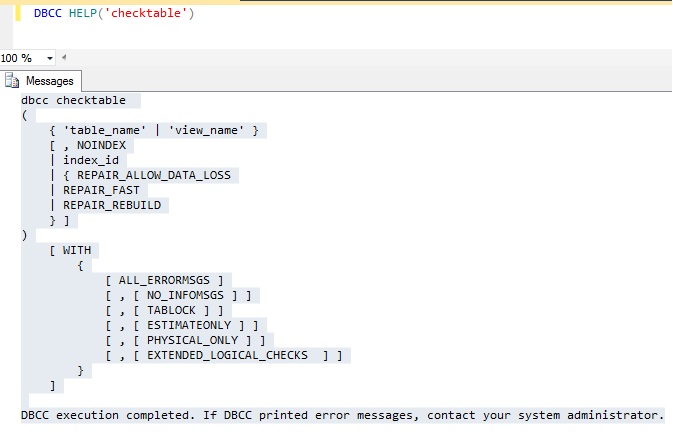
Don’t remember syntax, execute below command to get the syntax.

DBCC HELP('checktable')

DBCC